Nightwatch App icon
Nightwatch App icon

Nightwatch App

Free macOS menu-bar app for astrophotography: finds tonight's clear window, ranks your targets, tells you when it's worth setting up.
Nightwatch App screenshot 1

Cost / License

  • Free
  • Open Source (MIT)

Platforms

  • Mac
0likes
0articles
Save

Features

Properties

  1.  Privacy focused

Features

  1.  Dark Mode
  2.  Works Offline
  3.  No registration required
  4.  No Tracking
  5.  Ad-free
  6.  Sits in the menu bar
  7.  Weather Alerts
  8.  Desktop Widget

Nightwatch App News & Activities

Highlights All activities

Recent activities

Nightwatch App information

AlternativeTo Categories

Education & Reference, OS & Utilities

GitHub repository

  •  88 Stars
  •  3 Forks
  •  11 Open Issues
  •   Updated  
View on GitHub
Nightwatch App was added to AlternativeTo by Paul on and this page was last updated .

No comments or reviews, maybe you want to be first?

Official Links

What is Nightwatch App?

Free macOS menu-bar app for astrophotography: finds tonight's clear window, ranks your targets, tells you when it's worth setting up.

Trees, houses or a balcony roof in the way? Tell Nightwatch how much sky you can actually see, direction by direction or from a phone photo, and it only suggests targets that clear it.

  • Alerts: a heads-up an hour before sunset when tonight looks clear, with your plan and what the second forecast thinks, and a nudge as the clear window opens.
  • Tonight's plan: your favourites that are up in the clear window, in order of their best time, with your telescope's filter and frames, and one altitude chart showing where each is through the night. Two best at the same time are marked, so you can choose; take one off for the night, and the choice is kept.
  • The week ahead: up to ten nights in date order, each with its clear window or longest clear run, darkness and the Moon, so the best night of the week is easy to pick. Cloud from three days out is marked "Less certain".
  • Tonight or tomorrow night: the whole Targets window can show tomorrow night instead, so you can plan ahead. Each card says how much of your frame the target fills, and when it is up in the clear window.
  • A target's page: the survey photo fills the window at your field of view, and "How to shoot this" gives your telescope's filter, exposure and frames, sized to the clear window.
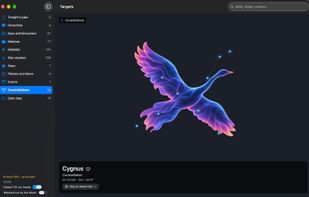
  • All 88 constellations: each one drawn as a figure over its stars.
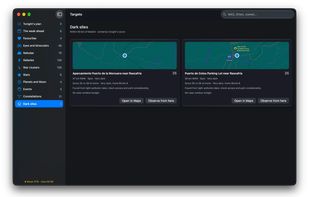
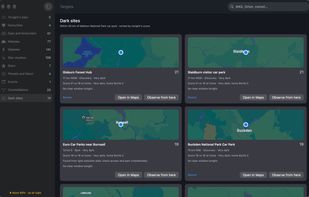
  • Dark sites: darker places nearby, scored for tonight against home, each with a map and Open in Maps.
  • Dark sites anywhere: the light-pollution data covers the world, so the same page finds dark car parks near a site in any country.
  • Your horizon: mark how high houses, trees or hills block the sky in each direction, or measure it from a phone photo, and every target, best time and plan follows it. The hills are found from terrain data.
  • Events: meteor showers, eclipses, close pairs, comets and space station passes, each with when and where to look, and Add to Calendar.
  • The Moon covering a star or planet: worked out a year ahead for your site, with each star's path behind the Moon, and when and at which edge it goes and comes back.
  • Desktop widgets: small, medium and large.