NightKeys icon
NightKeys icon

NightKeys

A MacBook lights its keyboard for any input. If you use the trackpad in a dark room, the keys light up every time you scroll or move the pointer, and they stay lit as long as you keep using it. Turning the backlight off doesn't help either, because then it's dark when...
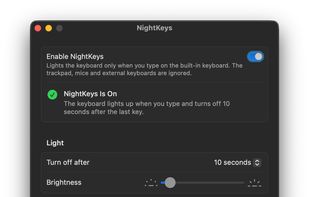
The settings window

Cost / License

  • Free
  • Open Source (MIT)

Platforms

  • Mac  Requires a MacBook with a backlit keyboard, Apple silicon and macOS 13 or later. Needs Input Monitoring permission.
Alternatives
0likes
0alternatives
0articles
Save

Features

Features

Highlights All activities

NightKeys News & Activities

Recent activities

NightKeys information

GitHub repository

  •  1 Stars
  •  0 Forks
  •  0 Open Issues
  •   Updated  
View on GitHub
NightKeys was added to AlternativeTo by Frat Ayaydn on and this page was last updated .

No comments or reviews, maybe you want to be first?

Official Links

What is NightKeys?

A MacBook lights its keyboard for any input. If you use the trackpad in a dark room, the keys light up every time you scroll or move the pointer, and they stay lit as long as you keep using it. Turning the backlight off doesn't help either, because then it's dark when you do want to type.

NightKeys lights the keyboard only when you type on the built-in keyboard. Touching the trackpad, moving a mouse or typing on an external keyboard no longer wakes the light. W.hen you stop typing, it goes off after the timeout set in System Settings > Keyboard.

It can also stay off in bright rooms, using the ambient light sensor and a threshold you pick. The background agent uses about 3 MB of memory and no CPU while idle