




NextDiff
Like
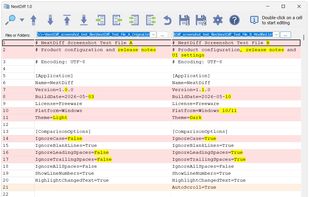
NextDiff is a free file and folder comparison program for Windows that highlights differences between text files, source code, logs, and folders in a side-by-side view.

Cost / License
- Free
- Proprietary
Application typeApplication types
 EU
EUPlatforms
- Windows

Features
Highlights All activities
NextDiff News & Activities
Recent activities
 DcXor added NextDiff as alternative to Placide Compare
- tkosoft added NextDiff
 tkosoft added NextDiff as alternative to WinMerge, Beyond Compare, KDiff3, Araxis Merge and 3 more


Developed by
 TkoSoft
 Licensing
Proprietary and Free product.Alternatives
8 alternatives listedBadge
Get an embeddable badge for NextDiffSupported Languages


No comments or reviews, maybe you want to be first?