NetworkMonitor icon
NetworkMonitor icon

NetworkMonitor

 Like

Live network speed in your macOS menu bar, with a per-app breakdown of your daily data usage. No permissions, no telemetry, no Dock icon.
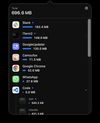
Per App Data Usage
Hotspot Metered Connection
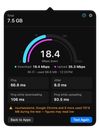
Internet Speed Test

Cost / License

  • Free
  • Open Source (MIT)

Application type

Platforms

  • Mac
0likes
0articles
Save

Features

Properties

Features

 Tags

Highlights All activities

NetworkMonitor News & Activities

Recent activities

NetworkMonitor information

AlternativeTo Category

Network & Admin

GitHub repository

  •  8 Stars
  •  2 Forks
  •  6 Open Issues
  •   Updated  
View on GitHub
NetworkMonitor was added to AlternativeTo by kevin-abou-hanna on and this page was last updated .

No comments or reviews, maybe you want to be first?

What is NetworkMonitor?

  • Live speed in the menu bar — download and upload on two lines, updated twice a second, at a fixed width so nothing jitters as the numbers change.
  • See which apps are using your data — sorted biggest first, with icons. Chrome's dozen helper processes show as one Google Chrome row; OS daemons collapse into a single System row.
  • A total per connection — join a different Wi-Fi network or hotspot and the totals start from zero, so what you see is what this connection has used. Open your hotspot somewhere new and you know exactly what each app spent on it. A dropout and a reconnect to the same network picks up where it left off.
  • Internet only, not LAN — mirroring to an Apple TV, Time Machine to a NAS or a Plex stream from your own server all cross Wi-Fi, but none of them cost you internet data, so none of them are counted against you.
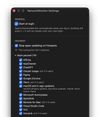
  • Hotspot aware — metered connections are flagged with a METERED badge, and one setting stops your apps updating while you're on one, puts the connection in Low Data Mode, and tells you which apps it can't stop. See below.
  • Speed test on demand — one click runs a fresh test with macOS's built-in networkQuality: download, then upload, then ping, jitter and ping under load. In Mbps or MB/s, and if another app was competing for the line, the result names it. See below. Resets at midnight too, for a connection you never leave, and survives restarts and reboots.
  • Stays out of the way — no Dock icon, no app switcher entry, no window to manage. Just the menu bar.