

NarraVoice
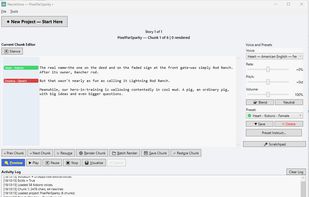
Local offline TTS narration studio for Windows (Kokoro + Smart IPA) + (Qwen3-TTS + Instruct) , side-by-side, with presets and batch render.
Cost / License
- Free
- Open Source (MIT)
Platforms
- Windows

NarraVoice
Features
Properties
- Privacy focused
Features
- No Tracking
- Works Offline
- Ad-free
- No Coding Required
- Built-in Dictionary
- Text to Speech
- No registration required
NarraVoice News & Activities
Recent activities
- hneal98 added NarraVoice
- POX updated NarraVoice
NarraVoice information
What is NarraVoice?
Tired of expensive per-character cloud bills and monthly subscriptions just to generate narration for your stories?
NarraVoice is a free, fully open-source text-to-speech studio built specifically for Windows desktop users who want absolute privacy, infinite voice generation, and Zero Cloud Dependencies. It acts as a dedicated production suite for converting raw text, PDF, and DOCX files into full-length MP3 audiobooks.
Key Capabilities:
Dual Local Engines: Seamlessly mix fast, lightweight Kokoro ONNX voices and highly expressive Qwen3-TTS models in the exact same story layout.
CPU-First Architecture: Highly optimized to run beautifully on standard consumer computers without requiring expensive, dedicated GPUs.
Line-by-Line Gutter Presets: Effortlessly switch voices, shifting pitch, rate, volume, or custom "Instruct" style notes line-by-line for Qwen3 Voices—perfect for complex multi-character narration.
Advanced Pronunciation: Built-in Smart IPA fallback overrides for Kokoro and phonetics global substitution lists to cleanly resolve difficult heteronyms and character names.
End-to-End Production: Ingest files ? chunk seamlessly at sentence boundaries ? rapidly preview / batch-render audio buffers ? merge everything into a finished audiobook file.
