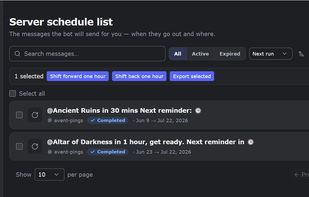
MsgPlanner is a bot that schedules messages on Discord, which has no built-in way to do it. It covers three kinds of timing. One-time: a single message at an exact moment, down to the second. Recurring: a fixed interval, like a reminder every 45 minutes or a ping every 3 days. Calendar: rules such as "every Monday at 9:00", "the 1st and the 15th", "the last day of the month", several times in the same day, or a window like "every hour from 17:00 to 20:00". A wizard builds the recurrence from a couple of questions, and before saving you see the list of upcoming runs.
Typical uses: weekly event announcements, daily task reminders, reposting server rules on a cycle, birthday wishes, match schedules, stream notifications. Every schedule runs in the timezone you choose, and daylight saving is handled automatically, so a 9:00 reminder stays at 9:00 all year.
Deliveries can go to text channels, announcement channels, threads and forum posts. In announcement channels the bot can auto-publish, so servers following the channel receive every delivery. Housekeeping is built in: a message can delete itself after a delay you set (from 1 minute to 30 days), or a recurring schedule can keep only its latest copy in the channel, which works well for "current status" posts.
Messages are written in an editor with a live preview that renders like Discord: headings, quotes, spoilers, code blocks, mentions with autocomplete, the server's own emojis, and dynamic timestamps that display in each reader's local time. Images can be attached. An embed builder supports up to 10 embeds per message with 25 fields each, including author, footer, thumbnail and colors.
Recurring content can draw from templates: up to 100 reusable messages per server, and one schedule can rotate through several templates, in order or shuffled (tips of the day, weekly spotlights). Whole setups can be exported and imported between servers, images included.
Everything is manageable from two places: inside Discord with slash commands (/schedule_msg creates schedules; a permission checker diagnoses delivery problems channel by channel) or from the web dashboard, logging in with a Discord account. Nothing to install or host. Schedules can be suspended and resumed at any time, and the interface is available in 9 languages.
The free plan has no time limit, and new servers get a two-week trial of the paid plan. Elite ($2.99/month per server) raises the limits (120 schedules, 4,000 characters, full embeds) and adds template rotation, backup import and a custom avatar for the messages it sends.






 EU
EU


 sclavaracer added MsgPlanner as alternative to schedul.io, Timy, Carl-bot, MEE6 and 1 more
 Chrdrk
No comments or reviews, maybe you want to be first?