


Move Window Between Desktops
1 like
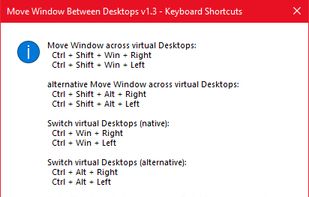
Lightweight Windows 10/11 utility that adds a single hotkey to move the active window between virtual desktops. Makes managing multiple workspaces far more efficient.

Cost / License
- Free
- Proprietary
 EU
EUPlatforms
- Windows

Features
Highlights All activities
Move Window Between Desktops News & Activities
Recent activities
 Fla added Move Window Between Desktops as alternative to dt_noodle, App Fleet, 9Desks, FreeVD and 4 more
- thinks Keyboard Shortcuts is a important feature of Move Window Between Desktops
 FAI-Solutions added Move Window Between Desktops as alternative to zVirtualDesktop and Windows 10 Virtual Desktop Enhancer
- FAI-Solutions added productivity as a feature to Move Window Between Desktops
- Paul updated Move Window Between Desktops
- FAI-Solutions updated Move Window Between Desktops
- FAI-Solutions A comment was removed from Move Window Between Desktops
- FAI-Solutions liked Move Window Between Desktops
- FAI-Solutions added Move Window Between Desktops


Developed by
 Johannes Faber (FAI-Solutions)
 Licensing
Proprietary and Free product.Alternatives
9 alternatives listedBadge
Get an embeddable badge for Move Window Between DesktopsSupported Languages


No comments or reviews, maybe you want to be first?