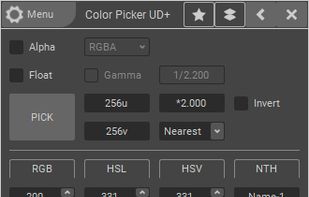
Hopefully, the last desktop color picker you will ever need. For developers/graphic designers, having simple and easy tools is essential. Created out of necessities, Color Pickin' is that kind of tool: simple, no fluff, just works.


MouseZoom is described as 'Nice but small utility. It zooms the current mouse position (50x) and show the color value and the absolute + relative position of the point where the mouse is' and is a Color Picker tool in the photos & graphics category. There are more than 50 alternatives to MouseZoom for a variety of platforms, including Windows, Mac, Linux, Web-based and iPhone apps. The best MouseZoom alternative is Realtime Colors, which is free. Other great apps like MouseZoom are gpick, Just Color Picker, Magnifixer and Instant Eyedropper.
Hopefully, the last desktop color picker you will ever need. For developers/graphic designers, having simple and easy tools is essential. Created out of necessities, Color Pickin' is that kind of tool: simple, no fluff, just works.


Hex Color Picker puts an extra tab in the system-wide color panel. Instantly see the hex color code for any color, and edit it just the same with a number of shorthands.


ColorSnapper — the missing color picker for OS X.
ColorSnapper is an easy-to-use tool for quickly finding out the color of any pixel on the screen. It is activated via a configurable system-wide hotkey, giving you a magnifying loupe to easily pick the pixel you need. The resulti.


ColorAid is a color picker and highlighter, which can be especially useful for the color blind. It lets you point a color on an image (either loaded from file or captured from the screen), and highlights all the areas of the image having that color (or a similar one, according...


Pikka - Color Picker is a easy to use color picker for Cocoa developers and designers, that works well with multiple screens.


Aurora is a beautiful and easy to use color picker and dictionary app. It is as feature-rich as it is gorgeous.


ColorPicker uses the camera or a photo of your iOS device to tell you the color you are pointing at. The free version of this app tells the RGB code only. You can upgrade to full version by InApp-purchase and access further color palettes including RAL and W3C color names, store...