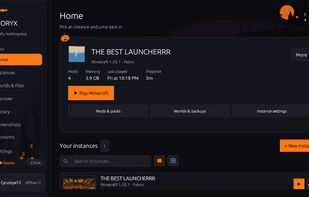
Monoryx is a free and open source Minecraft: Java Edition launcher, written in Rust and egui. It is made to be lightweight and simple, without any bloat and extra features that is not needed to manage Minecraft.
Using Monoryx you can make isolated instances of Minecraft, switch between mod loaders, manage your mods and modpacks, and change the theme of the launcher.
Features
Lightweight: Uses less than 50 MB ram by default when running the launcher, and has been optimized to use as little resources as possible.
No bloat: Runs a minimal and clean UI dedicated to managing and running Minecraft, without any unneccessary extra features.
Themes: Change the appearance of the launcher to your liking.
Official account support: Log in to the launcher with your official Microsoft account to back up and sync your saves, instances, settings, and more.
Isolated instances: Keep your instances of Minecraft separate from each other.
Multiple mod loaders: Switch between Vanilla, Fabric, Quilt, Forge, and NeoForge.
Modrinth and CurseForge support: Browse and install mods from Modrinth and CurseForge.
Dependency resolver: Lets you know what mods you need to install, and can help you troubleshoot issues caused by conflicting mods.
Mod library: Keeps track of all the mods you have installed and allows you to toggle them for specific instances of Minecraft.
Modpack support: Import .mrpack modpacks to make instances of Minecraft with all the mods bundled with the modpack.
Java version manager: Make sure the correct version of Java is used for the instance of Minecraft you are playing, or managing.
Offline profiles: Make profiles that do not require an internet connection.
Monoryx is actively being developed, and new features, performance improvements, and more are released regularly. If you want to contribute, report a bug, or if you have any suggestions, then feel free to do so. The code is completely open source, and can be found on GitHub.
Source code: https://github.com/DemonZ-Development/Monoryx
Web: https://demonz.org/projects/monoryx







 Cyrus-Bye added Monoryx as alternative to Prism Launcher, PineconeMC (formerly ElyPrism Launcher), Shard Launcher, MCRAFT.FUN and 34 more
 DemonZDevelopment


No comments or reviews, maybe you want to be first?