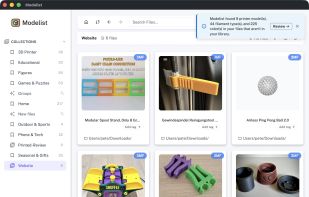
Modelist is a desktop app for makers that runs on Mac, Windows and Linux. It scans the 3D printing files already on a computer and turns them into a searchable gallery with visual previews. Files are indexed where they are and are never moved, renamed or changed.
It works with STL, 3MF, OBJ and SCAD files, and it can also index models inside ZIP archives without extracting them, so zipped downloads can be browsed and opened like any other file. It also finds duplicates, including renamed copies, by comparing exact bytes, similar names and sizes, and how the models look.
Models can be organized with coloured tags and notes that stay attached even when folders are reorganized. You can tag one file or many at once. Tag lists can be sorted by most used or A–Z and filtered by name, and new tags can be created with a colour from anywhere in the app. Collections can be nested, a model can go into several collections at once, and smart collections work as saved searches that update automatically as the library grows. You can sort the sidebar's collections and watched folders either in your own order or alphabetically.
Modelist also knows your printers. You can add them with their bed sizes, and the 3D preview shows each model on the printer bed it was made for. Any model opens in Bambu Studio, PrusaSlicer, OrcaSlicer, Cura or SuperSlicer with one click, and model links can be sent from an iOS or Android phone straight to the desktop app's inbox.
Everything runs locally, with no account and no cloud dependency. The free version supports up to 100 files, and paid licenses are a one-time purchase, not a subscription.






 EU
EU


 Peter Pohar

No comments or reviews, maybe you want to be first?