Mobile View icon
Mobile View icon

Mobile View

A Chrome extension that overlays real phone and tablet frames over any live website, so you see the desktop and mobile layout side by side at the same time.
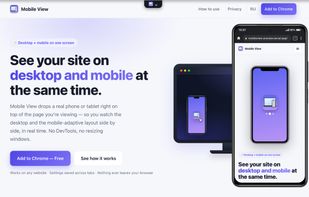
Main description

Cost / License

  • Free
  • Proprietary

Application type

Platforms

  • Google Chrome
1like
0comments
0articles

Features

Properties

  1.  Lightweight
  2.  Privacy focused

Features

  1.  Ad-free
  2.  No registration required
  3.  No Tracking
  4.  Screen Sharing
  5.  Dark Mode
  6.  Browser extension
  7.  Screen Recording

Mobile View News & Activities

Highlights All activities

Recent activities

Mobile View information

  • Developed by

    Unknown
  • Licensing

    Proprietary and Free product.
  • Alternatives

    6 alternatives listed
  • Supported Languages

    • English
Mobile View was added to AlternativeTo by Roman Serenko on and this page was last updated .
No comments or reviews, maybe you want to be first?

What is Mobile View?

Mobile View is a Chrome extension for previewing how any website looks on mobile — without leaving the page or opening DevTools. Click the toolbar icon and a realistic phone or tablet frame appears right on top of the site you're viewing, showing the desktop and the mobile (responsive) layout at the same time, on one screen.

Scrolling, clicks and typing stay synchronized between the desktop page and the mobile preview, so you can navigate both at once. You can rotate the device, switch between many built-in phones and tablets, or define a custom size and interface (iOS / Android / no OS).

It also includes one-click screenshots (device only, or full desktop + mobile view) and screen recording of the preview, exported locally as MP4 or WebM — with no "share your screen" dialog. The interface is available in 50 languages.

Everything runs entirely on the client: nothing is collected, stored or sent anywhere. Host access is optional and requested only when you open a preview.

Mobile View Videos

Official Links