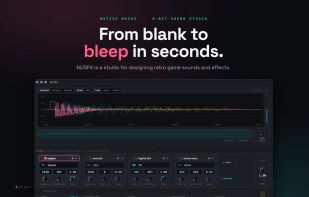
MJSFX is a native macOS sounds and effects design studio.
The whole app is one tight creative loop: start from a generator, listen, adjust, tweak, play, and export a drop-in WAV.
• FREE. No ads, no telemetry, and you own everything you make.
• Generators: Curated starting points for pickups, lasers, explosions, jumps, hits, power-ups, and UI blips. Pick one and you're already in the ballpark.
• Layers: Stack multiple voices into a single sound, each with its own pitch sweep, amplitude envelope, and filters.
• Effects: Per-layer chains of Reverb, Delay, Distortion, Bitcrush, Tremolo, Phaser, and ADSR. Drag to reorder; the signal flows left to right.
• LFOs: Bring sounds to life: modulate pitch, filters, effect parameters, layer gain, and even other LFOs. Six waveshapes, loop or one-shot, live animated scopes.
• Sound Portrait: Waveform, amplitude, and pitch fused into one live, color-coded image that redraws on every change. See what you hear.
• Library: Save your sounds and reopen them as documents. Unsaved work is restored on relaunch.
• Workspaces: Create and switch between separate sound libraries.
• Formulas: Builds arps, octave stacks, runs, and harmonic stacks as new layers on top of the active layer
• Themes: 20 built-in themes, light and dark, plus custom JSON themes you can install with a double click. Every visualization color is themeable.
• Keyboard first. Drive the entire faceplate from the keyboard, jump between layers with Cmd-1 through 9, and customize every shortcut.
• Extensive MIDI Support: Map knobs, faders, and pads to parameters, effects, LFOs, gains, and actions. Set an active layer's frequency to a MIDI note's exact Hz.
• Explore: Mutate every parameter for a fresh take, or randomize a brand-new sound. Every edit is undoable.
• No in-app AI, but the direct download (site or homebrew) version ships with an MCP server
• Sound files, templates, and other configuration files are repo-friendly JSON files
• Export: WAV at 44.1 / 22 / 11 kHz and 16 / 8-bit, plus per-layer stem export for your DAW or game engine.
Make some noise!






 MJS.DEV


No comments or reviews, maybe you want to be first?