Mikread icon
Mikread icon

Mikread

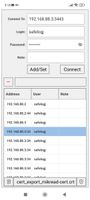
An application for reading SMS from MikroTik routers. Works with LTE and USB modems. Supports decoding of messages in UCS2 encoding.
sms from router
sms via email
routers list

Cost / License

Platforms

  • Android  api 23+
  • Android Tablet  api 23+
0likes
0articles

Features

No features, maybe you want to suggest one?

Mikread News & Activities

Highlights All activities

Recent activities

Mikread information

GitHub repository

  •  3 Stars
  •  0 Forks
  •  0 Open Issues
  •   Updated  
View on GitHub

Popular alternatives

View all
Mikread was added to AlternativeTo by safelogJ on and this page was last updated .
No comments or reviews, maybe you want to be first?

Official Links

What is Mikread?

An application for reading SMS from MikroTik routers. Works with LTE and USB modems. Supports decoding of messages in UCS2 encoding.
What the app does:

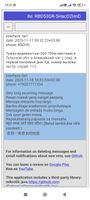
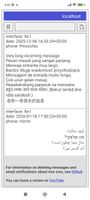
Connects to your MikroTik via API (port 8728) or REST-API (any www-ssl port) and reads incoming SMS. Correctly decodes SMS in UCS2 and 7-bit encoding (all alphabets, non-standard characters are displayed correctly). There is a function to delete SMS on the router (write permissions required).

Technical requirements:

API (port 8728) or REST-API (any www-ssl port) must be enabled on the router. A user with api and read permissions for reading via API. A user with rest-api, api, and read permissions for reading via REST-API. When connecting via REST-API, specify the port. To delete SMS, write permissions and SMS storage in the modem are additionally required (/tool/sms/set sms-storage=modem). Works only with RouterOS version 7.15 and higher. (sms - added SMS PDU to SMS inbox "print detail";) Using the app, you can also read SMS received from the router by email as a text file in JSON format. To open such a file in the app, connect to the address localhost or 127.0.0.1 To have the router send you such a file, use the instructions and script at the github

Security and privacy: Important: when connecting via API (port 8728), data (including login/password and SMS text) is transmitted in unencrypted form. If you connect to the router via the Internet (not in a local network), there is a risk of traffic interception by third parties. It is recommended to use the API in a local network.

Mikread Videos