-Digital models of over 100 legendary microphones
-Faithful reproductions of Neumann, AKG, and other classic mics
-Introduce analog-era warmth and saturation
-Fine controls for subtle variations
Expand Your Mic Locker
Instantly expand your mic locker with over 100 different models of vintage mics from Neumann, Telefunken, AKG, and others plus a wide selection of modern boutique mics.*
Analog Reproduction
Introduce as much or as little of that classic analog saturation sound into your mic as you want.
Croon Control
Manipulate each mic's specific range and options to maximize the subtle sonic characteristics that make each microphone unique.
Why Mic Mod?
AutoTune's Mic Mod plug-in is an all-in-one solution that gives you access to the most legendary microphones for vocals and acoustic instruments anytime, anywhere. Take your sound to the next level, thanks to this state-of-the-art microphone emulation software and the vast library of studio-standard microphones to choose from.
What is microphone modeling?
Microphone modeling can reproduce the sound of the most iconic microphones directly in your DAW, so you won't have to invest thousands of dollars on expensive gear to achieve the audio quality you've always dreamed of. A microphone modeling plug-in neutralizes the sonic characteristics of the microphone used for the recordings and applies the sonic features of the mic you selected, bringing to life a sound that'll enhance the quality of both vocals and acoustic instruments.
How does AutoTune's Mic Mod plug-in work?
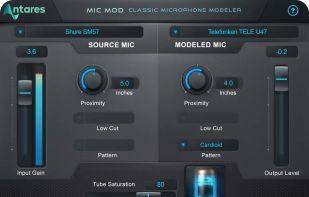
Make sure you record your vocals on a good-quality mic as Mic Mod (like all other microphone modeling plug-ins) only changes the sonic characteristics of the recording but does not improve the overall audio quality. Select the source mic from the top-left menu. If you can't find yours, go to the "Generic" section and choose the option that best describes your microphone. Next, choose the model you want your microphone to sound like from the top-right menu. Here you'll find a wide selection of legendary microphones for vocals and acoustic instruments. Use the Input and Output Gain to adjust the volume of your track before or after the AutoTune Mic Mod effect is applied. You can add tube saturation to add more warmth or even a distortion effect to your track. You can use the Proximity control knob to remove excessive low-end frequencies, which occur especially when singing very close to the microphone. Depending on the microphone you use and the one you select on AutoTune Mic Mod, you can choose the polar pattern for both mics and further enhance the audio output.







 alternativet0 added Antares Mic Mod as alternative to MeldaProduction MMicSim
 alternativet0 added Antares Mic Mod as alternative to Virtual Microphone System

No comments or reviews, maybe you want to be first?