MeshCoat icon
MeshCoat icon

MeshCoat

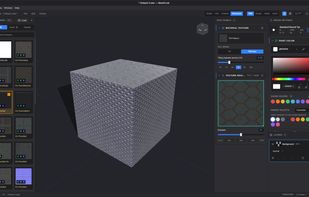
A dedicated 3D texture painting application for painting full PBR material channels directly onto 3D geometry with layers, procedural wear, and multi-mesh support.
MeshCoat screenshot 1

Cost / License

Application type

Platforms

  • Windows
  • Linux
  • Mac
0likes
0articles

Features

Properties

  1.  Privacy focused

Features

  1.  Portable
  2.  Built-in Color Picker
  3.  Non Destructive Editing
  4.  Custom Brushes
  5.  No registration required
  6.  Support for Layers
  7.  No Tracking
  8.  Drawing Tablet Support
  9.  Hardware Accelerated
  10.  Pressure Sensitivity
  11.  No Coding Required
  12.  Live Preview
  13.  Color Picker

MeshCoat News & Activities

Highlights All activities

Recent activities

MeshCoat information

AlternativeTo Categories

Photos & GraphicsSystem & Hardware

GitHub repository

  •  6 Stars
  •  0 Forks
  •  7 Open Issues
  •   Updated  
View on GitHub
MeshCoat was added to AlternativeTo by Trevor-Wessel on and this page was last updated .
No comments or reviews, maybe you want to be first?

Official Links

What is MeshCoat?

A dedicated 3D texture painting tool for texturing models directly in the viewport. It projects strokes onto UV space without bleeding through thin walls, writing complete PBR material sets in a single pass.

  • Direct PBR Painting: Paint Base Color, Roughness, Metalness, and tangent-space Normals simultaneously. Includes material presets and automatic PBR texture-set grouping from standard naming conventions.

  • Layer Stack & Masks: Non-destructive layers with live composite blending, adjustable opacity, layer masks, and real-time mirror symmetry along X, Y, or Z axes.

  • Painting Toolkit: Full tool suite including Brush (pen pressure, triplanar, UV projection), Eraser, Line, Stamp, Fill Bucket, and an Effects Brush (Blur, Sharpen, Smudge, Pixelate across all active channels).

  • Procedural Generators: Built-in Edge Wear and Crevice Dirt wizards for generating real-time procedural weathering, dirt, and edge highlights directly to layers.

  • Selection & Stencils: Screen-space viewport stencils, face-selection masking, and whole UV-island isolation.

  • Multi-Piece Workflows: Supports multi-object files with dedicated texture sets, layers, resolutions, and isolation modes per piece to prevent cross-painting.

  • Import & Export: Loads .glb, .gltf, and .obj formats. Exports native or scaled (up to 4K) maps as individual files or combined atlases, supporting unpacked channels or packed ORM maps.

  • Viewport & Lighting: Real-time PBR viewport featuring image-based lighting presets (Studio, Flat, Outdoor, Showcase), wireframe overlays, and isolated single-channel inspection modes.

MeshCoat Videos