


Meresei
Minimalistic calendar tool designed specifically for people with Non-24-Hour Sleep-Wake Disorder (Non-24), a condition where your internal clock runs longer (or shorter!) than 24 hours, causing sleep schedules to shift daily.
Cost / License
- Free
- Open Source (MIT)
Platforms
- Online

Meresei
Features
Meresei News & Activities
Recent activities
Meresei information
Licensing
Open Source (MIT) and Free product.Written in
Alternatives
0 alternatives listedSupported Languages
- English

AlternativeTo Categories
Office & Productivity, Sport & HealthGitHub repository
- 398 Stars
- 83 Forks
- 38 Open Issues
- Updated
What is Meresei?
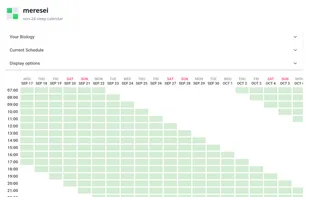
As someone with a 25-hour circadian cycle, I spent years manually drawing these calendars in Excel to track my constantly shifting schedule. It was tedious, so I decided to automate it. Once I built it for myself, making it available for everyone else wasn't much of a leap!
Key features:
Customizable cycles
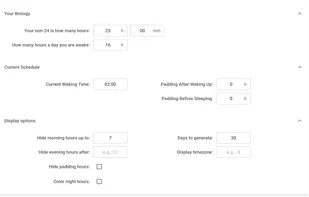
You can set any cycle length - 23 hours, 25 hours, 30 hours - anything. You can also set partial hours, e.g. "25h 30mins" - this is especially important for people whose circadian cycle is not close to a whole number.
Padding hours - Set buffer zones around your sleep and wake times.
Since Non-24 schedules can shift unpredictably (sometimes jumping 2-3 hours instead of the usual 1-hour drift), padding helps avoid scheduling conflicts and eliminates the need for alarm clocks.
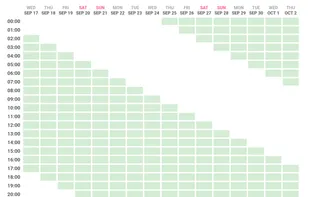
Interactive cells - Click any cell to toggle its state.
For example, if you click on the green cell, the green color will be removed. This is especially useful for sending screenshots with "available times for an appointment" to people - if you already have an appointment during some hour, just click on it to mark that timeslot as unavailable. This is also useful for making your schedule seem normal by making the ladder form of your schedule less apparent (I found people think I'm kidding with my ladder-shaped schedule, and explaining can take long if you're just going for one-off appointment).
Timezone management
Mark your rhythm in your timezone, and then display it in any timezone you want. Useful for when you're arranging a call with someone.
The tool generates weeks of future schedule predictions, though like weather forecasts, accuracy decreases over time.