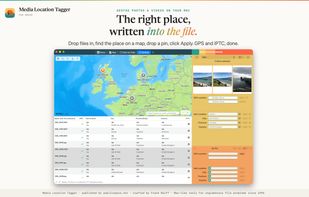
Media Location Tagger does one job: it puts the right location into your photos and videos. Drop files in, find the place on a map, drop a pin, click Apply. GPS coordinates and the IPTC city, province, country and sub-location fields are written straight into the files, in every metadata standard that matters (EXIF, QuickTime, IPTC and XMP, kept in sync), so Lightroom, Apple Photos, stock agencies and archive systems all agree on where a picture was taken.
What it is for:
- Your camera has no GPS. Search for the place, drop a pin, apply it to one file or to a thousand. Drop several pins for a trip and switch between them.
- Your iPhone photos have coordinates but no place names. Fill in city, province, country and sub-location from the GPS data, using a built-in offline database. No internet connection, no rate limits.
- The location is wrong. Spot the stray cluster on the map, select it with a rectangle, drop a new pin, and overwrite GPS and IPTC in one go.
- You want it your way. Accept the suggested name, pick one already used in the batch, or type your own. "New South Wales" instead of "NSW" is your call, not the database's. Save the places you keep coming back to, with your own names, and drop them on any future batch.
Every change is previewed before it is written, and if a write fails on any file you are told which one and why. There is no library to maintain, no rendering controls and no subscription: just the files, the metadata and the map.
Reads and writes HEIC, JPEG, RAW (CR2, NEF, ARW, RAF, ORF, DNG and more), TIFF, MOV and MP4. Native on Apple Silicon and Intel. Requires macOS 15 Sequoia or later.
From the makers of A Better Finder Rename and A Better Finder Attributes. Free trial (saves changes to 5 files per session), one-time purchase.






 EU
EU


 frankreiff added Media Location Tagger as alternative to Houdahgeo, Geosetter, GeoPhoto, GeoTag for macOS and 4 more
 publicspace.net


No comments or reviews, maybe you want to be first?