

MarkWell
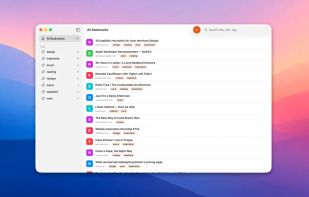
MarkWell is a native bookmark manager for Mac, iPhone, and iPad. Save links from anywhere, organize them with tags, and find them again later — across all your devices, with no separate account to manage.
Cost / License
- Pay once
- Proprietary
Platforms
- Mac
- iPhone
- iPad
Features
Properties
- Lightweight
- Privacy focused
Features
- No Tracking
- No registration required
- Dark Mode
- Works Offline
- Ad-free
- Tag based
- Tagging
- Sync with iCloud
MarkWell News & Activities
Recent activities
POX added MarkWell as alternative to wallabag, Obsidian Web Clipper, Instapaper and Curio- POX added MarkWell
MarkWell information
What is MarkWell?
MarkWell is a native bookmark manager for Mac, iPhone, and iPad. Save links from anywhere, organize them with tags, and find them again later — across all your devices, with no separate account to manage.
SAVE FROM ANYWHERE Share any URL from Safari, Mail, Messages, or any other app, straight into MarkWell using the system share sheet. The app fetches the page's title and favicon for you, so the bookmark looks right the moment it lands.
TAGS, NOT FOLDERS Tag a link with as many ideas as it has. Filter the sidebar by tag to find things by mood, topic, or project — whatever sticks in your head. No nested folders to maintain, no rigid structure to fight against.
SYNCED THROUGH YOUR OWN ICLOUD Bookmarks sync end-to-end through your own iCloud account using Apple's CloudKit framework. There is no MarkWell account, no MarkWell server, and no analytics. Your data stays under your Apple ID, and the same bookmark you save on your iPhone shows up on your Mac a few seconds later.
PRIVACY-FIRST MarkWell collects nothing. The only network call the app makes on its own is to read the title and favicon of a URL when you save it. There are no third-party SDKs, no advertising, no telemetry. The privacy policy at bendansby.com/apps/markwell/privacy.html spells it out in detail.
REQUIREMENTS
- Mac running macOS 14 Sonoma or later
- iPhone or iPad running iOS / iPadOS 17 or later
- Optional: iCloud account for cross-device sync (works fully offline without one)


