


Markleaf
Like
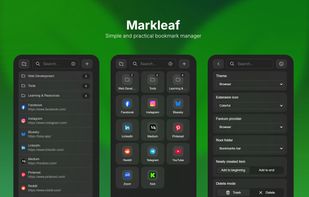
Simple and practical bookmark manager.

Cost / License
- Free
- Open Source (GPL-3.0)
Application type
Platforms
- Google Chrome
- Chromium
- Mozilla Firefox


Features
Highlights All activities
Markleaf News & Activities
Recent activities
- Baki Nazik updated Markleaf
- Baki Nazik updated Markleaf
- Baki Nazik updated Markleaf
 Baki Nazik added Markleaf as alternative to Bookmark Manager
- Baki Nazik updated Markleaf
- Baki Nazik updated Markleaf
- Baki Nazik updated Markleaf
- Baki Nazik added Markleaf
 Baki Nazik added Markleaf as alternative to Bookmark Manager Plus and Advanced Bookmark Search


Developed by
 Baki Nazik
 Licensing
Open Source (GPL-3.0) and Free product.Alternatives
2 alternatives listedBadge
Get an embeddable badge for MarkleafSupported Languages
AlternativeTo Category
Web BrowsersGitHub repository
- 3 Stars
- 1 Forks
- 0 Open Issues
- Updated

No comments or reviews, maybe you want to be first?