MakeLesson is an interactive exercise and assignment platform for tutors and teachers. It makes the lesson, checks the homework, and keeps your calendar, payments and income in one place.
Preparation. Upload a PDF, a photo of a textbook page or a scan, paste text, or just type a topic. In less than a minute MakeLesson turns it into a complete lesson with pictures, audio and interactive exercises. Change it by asking: "make the second exercise harder", "add two more questions", "turn this into a crossword", "take it down to A2". Small tweaks can be made by hand, free on every plan. Share the lesson as a link, embed it on a Miro board, or export a PDF.
Checking. Objective answers are checked the moment a student submits, so you open the list already knowing who struggled and where. Open answers stay yours to judge. An optional auto review suggests a rating and flags answers worth a second look. You comment, rate and finalize. Nothing reaches the student until you do.
Students. One link covers the homework and its return. Students open it on any phone, tablet or computer, with nothing to install. Exercises are built for phones first, where most homework gets done. Students with a free account keep their lessons and feedback in one place.
Ten exercise types: fill-in-the-blank, multiple choice, dropdown select, matching, drag-and-drop, unscramble, crossword, listening, multi-speaker dialogue and open writing. All are built for touch and collected on the same review page. Listening and dialogue use built-in audio with 30 voices, a separate voice for each speaker. Pictures are made for each lesson too.
Calendar. Schedule one-to-one and group lessons, once, every week or every 2 weeks. Drag a student or a group onto the week. Drag a lesson to a new time, and only that lesson moves. Attach the lesson worksheet and the homework to each lesson.
Notifications. Students get a Telegram reminder before each lesson, and a notification when a lesson is added, moved or cancelled, or their homework is reviewed. You get one when a student hands in homework.
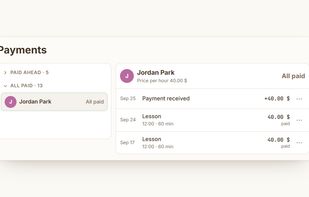
Payments. Set a price per hour for each student. Press Paid when you receive a payment, or Everyone paid for a whole group. See who has paid, who owes you and who has paid ahead. Every payment keeps its history.
Overview. Your income this month, what you are owed, lessons finished and upcoming, and your income for the last six months side by side.
Compared with Wordwall, Liveworksheets, BookWidgets, Quizizz, H5P and Google Forms: you describe the lesson you want, including the exercises, layout, colours and pictures, and MakeLesson builds it. You change it the same way.
Pricing: Free plan with 20 one-time credits, unlimited students, and Calendar and Payments for 5 students. Pro $6 a month: 300 credits, Calendar and Payments for all students. Max $20 a month: 1,200 credits. Credits pay for making and editing lessons with AI and for auto review. Editing by hand, the calendar and payments need no credits.







 Juan José de Haro added MakeLesson as alternative to OpenWorksheets
 Danilo Venom added MakeLesson as alternative to Socrati, Quizlet, Lesson Mate AI and TeacherForge
 Goodwin3000 added MakeLesson as alternative to Wordwall, Quiz Whizzy, Cloze Generator, Qfunny and 24 more



 MakeLesson


No comments or reviews, maybe you want to be first?