MacDelta icon
MacDelta icon

MacDelta

 Like

Track Mac system changes, find recent files and downloads, and search opt-in clipboard history. Local storage, macOS 14+, $9.99 once. No subscription.
MacDelta screenshot 1

Cost / License

  • Pay once
  • Proprietary

Platforms

  • Mac
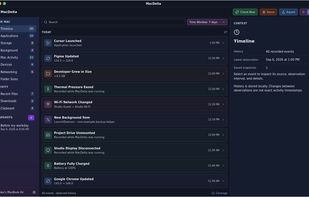
MacDelta screenshot 1
Alternatives
0likes
0alternatives
0articles
Save

Features

Features

Highlights All activities

MacDelta News & Activities

Recent activities

MacDelta information

  • Developed by

    IN flagMixout Technologies Private Limited
  • Licensing

    Proprietary and Commercial product.
  • Pricing

    One time purchase (perpetual license) that costs $10.
  • Alternatives

    0 alternatives listed
  • Badge

    Get an embeddable badge for MacDelta
  • Supported Languages

    • English

AlternativeTo Categories

OS & Utilities, File Management
MacDelta was added to AlternativeTo by Paul on and this page was last updated .

No comments or reviews, maybe you want to be first?

What is MacDelta?

The memory of your Mac.

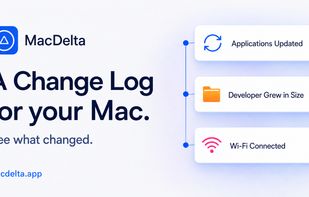
MacDelta 2.0 remembers what happened on your Mac. Explore system changes, find recently used files and downloads, recall copied content, and pick up where you left off—all in a compact native workspace.

  • Keep up with your apps: Installs, updates, removals, launches and closes, with versions and recorded context. No foreground/background noise.
  • See what grew in size: Inspect every monitored folder in a compact side panel. Expand subfolder sizes and compare with a previous capture or saved snapshot—even below timeline thresholds.
  • Track background item changes: See when persistent background definitions appear or change. Technical details are there when you need a closer look.
  • Track activity and state changes: Sleep, wake, battery and Low Power Mode, plus drive mounts, display connections, and high thermal pressure with recovery. Useful context while MacDelta is running, without constant percentage or temperature updates.
  • Inspect Networking changes: Wi-Fi connection changes, Bluetooth on/off and supported paired accessories. Brief fluctuations are filtered, and matching Wi-Fi notifications become one clear event.
  • Find recent files: Search recently used, modified and created files. Filter the recorded activity, inspect metadata, and jump to Finder or Quick Look. Coverage follows Spotlight indexing and macOS access.
  • Remember that download: Browse recent downloads, large files and installers. Find older downloads with no recorded use. Missing use metadata is not proof a file was never opened.
  • Track your clipboard history: Optional clipboard history for text, URLs, files and supported images. Search, pin, copy again or delete an entry. Recording starts only when you enable it.
  • A shortcut to your history: Open global history search or glance at recent events in the menu bar. Pause recording and return to the full app at the selected event.