

LoupixDeck icon
LoupixDeck icon

LoupixDeck

 3 likes

LoupixDeck is a free, open-source replacement for the official Loupedeck and Razer software. It supports the Loupedeck Live, Live S and CT as well as the Razer Stream Controller and Stream Controller X.
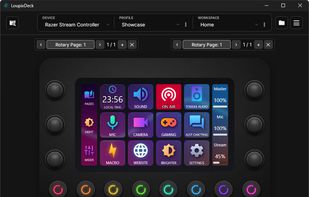
LoupixDeck screenshot 1

Cost / License

  • Free
  • Open Source (MIT)

Platforms

  • Windows  Windows 10 and 11, x64 and ARM64. Available as an installer or as a portable zip. On Windows on ARM devices like the Surface Pro X, use the ARM64 build, since the x64 version shows blank windows under emulation.
  • Mac  Experimental alpha builds for Apple Silicon and Intel Macs, provided as DMG files. Macros require Accessibility permission in the system settings.
  • Linux  Self-contained builds with the .NET runtime included. Can be installed with a one-line install script. Input for macros uses uinput.
3likes
0articles
Save

Features

Properties

Features

Highlights All activities

LoupixDeck News & Activities

Recent activities

LoupixDeck information

AlternativeTo Categories

OS & Utilities, Video & Movies, System & Hardware, Gaming Software

GitHub repository

  •  53 Stars
  •  14 Forks
  •  6 Open Issues
  •   Updated  
View on GitHub
LoupixDeck was added to AlternativeTo by Radi-Two on and this page was last updated .

No comments or reviews, maybe you want to be first?

What is LoupixDeck?

LoupixDeck is a free, open-source replacement for the official Loupedeck and Razer software. It supports the Loupedeck Live, Live S and CT as well as the Razer Stream Controller and Stream Controller X. It runs natively on Windows and Linux, including SteamOS, and there are experimental builds for macOS.

You can organize everything into profiles, workspaces, pages and folders. Touch buttons are built from layers like images, animated GIFs, short video clips, text and icons, and each button can have several states. Dials have separate actions for turning left, turning right and pressing. Pages can also switch automatically when you change to another app.

The visual macro editor covers keyboard and mouse input, delays, variables, conditions and loops, so you don’t need to write scripts. Integrations for OBS, DaVinci Resolve, Home Assistant and more are available in the built-in Plugin Store, and there is an SDK if you want to write your own plugins.

You can use several devices at the same time, even two of the same model. Profiles can be exported and shared, and existing Loupedeck profiles can be imported. There is also a command line interface for automation.

The app is available in English, German and Spanish and is released under the MIT license.