
LockMic icon
LockMic icon

LockMic

 Like

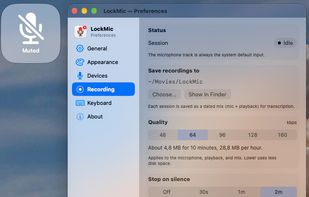
LockMic mutes your microphone at the system level through Core Audio, so Zoom, Teams, Meet, FaceTime, browsers and every other app see a muted mic. Toggle it with ⌘⇧M or from the menu bar. A small on-screen HUD shows the state, and an optional floating indicator stays visible on...
LockMic screenshot 1

Cost / License

  • Free
  • Open Source (MIT)

Application type

Since

  • New

Updated

  • Updated Oct 2026

Platforms

  • Mac  Requires macOS 14 Sonoma or later.
0likes
0articles
Save

Features

Properties

Features

Highlights All activities

LockMic News & Activities

Recent activities

LockMic information

AlternativeTo Categories

Office & Productivity, Audio & Music

GitHub repository

  •  3 Stars
  •  1 Fork
  •  0 Open Issues
  •   Updated  
View on GitHub
LockMic was added to AlternativeTo by Oleg-Chernyshev on and this page was last updated .

No comments or reviews, maybe you want to be first?

Official Links

What is LockMic?

LockMic mutes your microphone at the system level through Core Audio, so Zoom, Teams, Meet, FaceTime, browsers and every other app see a muted mic. Toggle it with ⌘⇧M or from the menu bar. A small on-screen HUD shows the state, and an optional floating indicator stays visible on each display. It also supports push-to-talk and push-to-mute.

It can also record all your mics plus system audio into one compressed file on your Mac. That's handy for recording meetings and transcribing them later. It's light: about 0.1–0.2% CPU idle and under 50 MB RAM while recording. Free, MIT licensed, macOS 14+.