Stop typing. Start talking.
LocalWhisper turns the Space key into a global push-to-talk microphone. Hold it anywhere on your computer, speak, and release — your transcribed text is pasted at the cursor. In any app: browser, IDE, chat, email, Word, you name it.
It runs OpenAI Whisper locally on your own machine. Nothing ever leaves your computer. No API key. No subscription. No cloud.
Why people love it
-
Truly system-wide. Works in every text field on Windows, not just inside one app.
-
Local & private. Audio never leaves your device. Perfect for confidential notes, journalism, medical, legal, or just peace of mind.
-
No subscription. Pay once. Use forever.
-
Multilingual. Auto-detect or pin to any of Whisper's main languages, 90+ recognised in total.
-
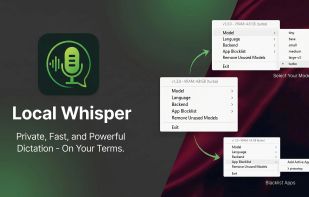
Choose your model. From tiny (instant, lightweight) to large-v3 (best accuracy) and the default, fast turbo model : you decide the speed/quality tradeoff.
-
Push-to-talk feels natural. No wake word, no awkward "Hey Computer." Just press Space and talk like a normal human.
What's in the box
-
Two Windows installers: CPU-only and NVIDIA CUDA (both GPU/CPU)
-
Tray icon, language picker, model picker, GPU/CPU picker
-
Clear first-launch overlay when a Whisper model has to be downloaded
-
Free updates for life
-
Commercial use allowed (one license per user)
System requirements
-
Windows 10/11 (64-bit)
-
4 GB RAM minimum, 8 GB+ recommended for medium/large models
-
Optional: NVIDIA CUDA GPU 2xxx/3xxx/4xxx/5xxx min 8 GB VRAM — much faster transcription
-
5 GB disk for the larger GPU version + model (max +5GB, default turbo model has 1,8 GB)
-
Internet connection for the first model download or subsequent, then 100% offline
How it works
Install LocalWhisper.
Pick the CPU installer, or the CUDA installer if you have an NVIDIA GPU.
The first launch downloads the Whisper model into your Windows user data folder.
System Tray icon with small menu signlas LocalWhisper is ready.
Hold Space anywhere ? speak ? release. Done.
That's the whole product.
Hi, I'm Valentin. I built LocalWhisper because I wanted dictation that didn't phone home. If something doesn't work for you, email me — I read every message.
FAQ:
Is my voice actually never sent to the cloud?
Correct. Whisper runs locally on your CPU or GPU. LocalWhisper makes zero outbound network requests for transcription.
Do I need an OpenAI API key?
No. Whisper is OpenAI's open-source model — completely separate from their paid API.
Is it fast?
Depends on your hardware and chosen model. With the turbo or small model on a recent CPU you'll get faster than real-time results, meaning 20 seconds talk -> about 10 seconds transcribe. With CUDA on an NVIDIA GPU it's instant.
Can I use it commercially?
Yes. One license per user, unlimited personal/commercial use.
Does it work in [Word / Slack / VS Code / my browser]?
Yes — anywhere you can paste text with Ctrl+V.
macOS support?
Not yet. On the roadmap.





 EU
EU
 Valentin Klein
No comments or reviews, maybe you want to be first?