





LiveFaceSwap Desktop
1 like
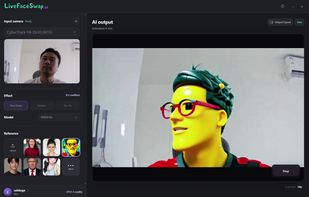
Desktop client for real-time cloud AI face swap, try-on and restyle effects. It transforms a live camera feed without installing local models or using a GPU, then routes the output through a virtual camera to streaming, meeting and video-call apps on Windows and macOS.

Cost / License
- Subscription
- Proprietary
Application type
Platforms
- Windows
- Mac
- Linux


Features
Highlights All activities
LiveFaceSwap Desktop News & Activities
Recent activities
- LiveFaceSwap AI added LiveFaceSwap Desktop
 Mauricio B. Holguin added LiveFaceSwap Desktop as alternative to Swapface, Pykaso.ai, Facecam, Facecam.ai and 3 more
- Mauricio B. Holguin updated LiveFaceSwap Desktop
- LiveFaceSwap AI updated LiveFaceSwap Desktop
 LiveFaceSwap AI added LiveFaceSwap Desktop as alternative to LiveFaceSwap AI, Faceswapper.ai, FaceSwap, SwapMyFace and 6 more
- LiveFaceSwap AI updated LiveFaceSwap Desktop
- LiveFaceSwap AI A comment was removed from LiveFaceSwap Desktop
- LiveFaceSwap AI updated LiveFaceSwap Desktop
- LiveFaceSwap AI updated LiveFaceSwap Desktop
- LiveFaceSwap AI liked LiveFaceSwap Desktop


Developed by
Nano Agent LLCLicensing
Proprietary and Commercial product.Pricing
Subscription ranging between $10 and $69 per month.Alternatives
17 alternatives listedBadge
Get an embeddable badge for LiveFaceSwap DesktopSupported Languages


No comments or reviews, maybe you want to be first?