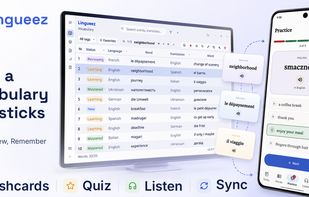
Lingueez helps you build vocabulary across languages and actually remember it.
Add a word the moment you meet it — from any app, with a global shortcut — and Lingueez looks up its definition and translation for you. It then turns your personal word list into spaced-repetition flashcards that resurface each word right before you'd forget it, so your study time goes where it's needed most. And when recognizing a word is no longer enough, the quiz asks you to pick the right answer — or type it out yourself, in either direction.
Beyond flashcards, Lingueez reads your words aloud with natural text-to-speech and generates short reading passages built from the vocabulary you're learning, so you see every word in real context.
Your library is yours: everything works offline, with no account required. Sign in only if you want your words and progress synced across devices.
Free and open source. No ads, no subscription.
Key features:
• Instant capture — a global hotkey adds a word from any app, with the translation and definition filled in
• Flashcards — SM-2 spaced repetition, custom decks, and an audio mode that flips cards in time with the voice
• Quiz — multiple choice or typed answers, in both directions, with instant feedback
• Read-aloud — natural text-to-speech in 65 languages, plus MP3 export
• Reading — import from files, the web, Wikipedia, or RSS, with side-by-side translation and synced audio
• Statistics — status breakdown, daily streaks, and progress over time
• 105 languages for your words, 32 for the interface
• Import and export — Excel in; PDF, Excel, CSV, MP3, or Anki-ready TXT out
• Works offline, with optional cloud sync







 Yurii Lysak



No comments or reviews, maybe you want to be first?