

LightBuddy icon
LightBuddy icon

LightBuddy

LightBuddy lives in your Mac’s Menu Bar and allows you to add an adjustable ring light around your display.
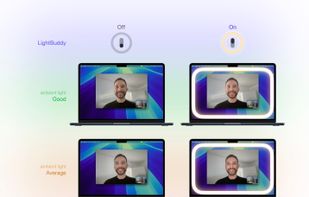
LightBuddy screenshot 1

Cost / License

  • Pay once
  • Proprietary

Platforms

  • Mac
0likes
0comments
0articles

Features

Properties

  1.  Privacy focused
  2.  Lightweight

Features

  1.  Works Offline
  2.  No registration required
  3.  Ad-free
  4.  Custom overlays
  5.  Live Streaming

LightBuddy News & Activities

Highlights All activities

Recent activities

LightBuddy information

  • Developed by

    Buddy Software LTDA
  • Licensing

    Proprietary and Commercial product.
  • Pricing

    One time purchase (perpetual license) that costs $5.
  • Alternatives

    2 alternatives listed
  • Supported Languages

    • English
LightBuddy was added to AlternativeTo by BarnMTB on and this page was last updated .
No comments or reviews, maybe you want to be first?

What is LightBuddy?

Look better on video calls using the screen you already have.

LightBuddy lives in your Mac’s Menu Bar and allows you to add an adjustable ring light around your display.

Unlike the built-in feature Apple added in macOS 26.2, LightBuddy supports macOS 14 Sonoma or later, works on Intel and Apple Silicon Macs, and doesn't require an Apple-branded display.

If your room lighting casts shadows, a gentle front light can make a real difference. LightBuddy turns your display into a configurable light source — no need to rearrange your desk. • Menu Bar control - LightBuddy isn’t tied to a specific camera app. Turn the ring light on/off from the Menu Bar whenever you need it. • Works on more Macs - Runs on macOS Sonoma and later, including Intel Macs. • Multi-display - Use a ring light on each connected display, or just one. Create interesting lighting setups with multiple displays. • HDR option - On HDR-capable displays, LightBuddy can push the ring area brighter than the rest of the screen, so you can keep your display comfortable while keeping your face well lit. • Color temperature - Match your room lighting with a temperature slider, or pick any color if you want something more creative. • Any display - LightBuddy is optimized for Apple displays, but it works with third-party displays as well. The results depend on brightness and panel quality, but good displays work very well.

A single license can be used in up to 5 Macs.