Leumos AI is AI color grading software for video that runs online, in a desktop browser such as Chrome, Edge or Safari 17, with nothing to install. It is made for filmmakers, editors and videographers who want every shot of an edit, from weddings and events to documentaries, to share one look. You can try the studio without an account, and start on the Free plan without a credit card to match and export.
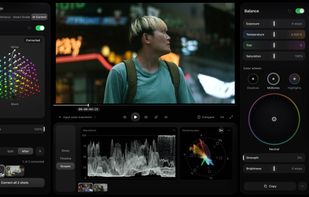
Choose a still whose look you love and Leumos matches your shot to it, then carries that look across the rest of the edit or pastes one grade onto other shots. With no reference, Smart Grade reads the shot and suggests eight grades, and AI Color Correction sets exposure, white balance and black and white levels in one pass. Refine with Balance, Tone, Colors and Skin tone, and check the result on a waveform and vectorscope.
Import clips, or bring in a Premiere Pro or DaVinci Resolve cut as an XML file, and split long clips into shots with the cuts detected for you. Log footage from 16 camera makers, including Sony, Canon, ARRI, RED, Panasonic, Fujifilm, Nikon, DJI, Blackmagic, GoPro and Apple (Apple Log 2 included), is converted through ACES on every plan, including Free. Leumos reads the camera metadata and suggests the input transform.
Grading previews run in your browser; reference matching and the final export run on Leumos servers. Exports carry no watermark on any plan, with presets for a master, YouTube, Instagram, Vimeo or an edit handoff. Lite and Studio can also download a .cube LUT for each shot, to use in DaVinci Resolve or Premiere Pro.
Plans: Free has 10 reference matches a month and 1080p export. Lite ($19 a month) has 50 matches, 4K 10-bit export and LUT download. Studio ($39 a month) has 150 matches, 4K 10-bit and a ProRes 422 HQ master. Paid plans are billed monthly and can be cancelled anytime. Your footage is never used to train AI models.







No comments or reviews, maybe you want to be first?