LearnScreen icon
LearnScreen icon

LearnScreen

 Like

Answer one flashcard in the language you're learning before Instagram or TikTok opens. App blocker meets spaced repetition.
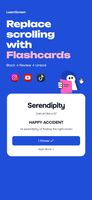
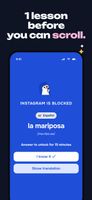
Block, review, unlock: a flashcard stands between you and the feed.
The Screen Time shield on a blocked app: answer the word to unlock it for a few minutes.
+3
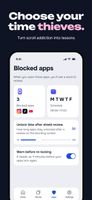
Pick the apps to block, the days, and how long a correct answer unlocks them.

Cost / License

  • Subscription
  • Proprietary

Application type

Since

  • Since 2026

Platforms

  • iPhone  Requires iOS 18 or later and Screen Time permission.
  • iPad  Requires iPadOS 18 or later and Screen Time permission.
0likes
0articles
Save

Features

Properties

Features

Highlights All activities

LearnScreen News & Activities

Recent activities

LearnScreen information

  • Developed by

    Roman Grunin
  • First released

    2026
  • Licensing

    Proprietary and Commercial product.
  • Pricing

    Subscription ranging between $5 and $10 per month.
  • Alternatives

    27 alternatives listed
  • Badge

    Get an embeddable badge for LearnScreen
  • Supported Languages

    • English
    • German
    • Spanish
    • French
    • Italian
    • Polish
    • Russian
    • Japanese
    • Korean
    • Portuguese
    • Chinese
    • Arabic
    • Dutch
    • Hindi
    • Thai
    • Turkish
    • Ukrainian
    • Vietnamese

AlternativeTo Category

Education & Reference

Popular alternatives

View all
LearnScreen was added to AlternativeTo by Roman-Grunin on and this page was last updated .

No comments or reviews, maybe you want to be first?

Official Links

What is LearnScreen?

LearnScreen is an iPhone and iPad app blocker that turns the urge to scroll into vocabulary practice. Pick the apps, categories and websites that eat your time and when the limit applies. When you open one, LearnScreen shows a flashcard from your own list on Apple's Screen Time shield. Answer it and the app unlocks for a few minutes, then locks again by itself.

Every word has its own spaced-repetition schedule (SM-2), so hard words come back sooner. Study the built-in library (1,080 words per language in 18 topics), or add your own words by typing them, pasting a list, importing a CSV or photographing a page.

Teaches 11 languages: English, German, Spanish, French, Italian, Japanese, Korean, Polish, Brazilian Portuguese, Russian and Chinese. Works offline, no account needed; optional backup goes to your own iCloud. 7-day free trial, then a monthly or yearly subscription.

Version 4.0 (30 November 2026) adds Anki deck import, typed answers, spoken pronunciation, readings for Japanese, Korean and Chinese, and IELTS/TOEFL and DELE exam word packs.