LeakCheck compares your passwords and email addresses to millions of known data leaks – right on your PC.
Check Passwords. Monitor Accounts. Stay Safe.
- LeakCheck makes protecting your digital identity easier than ever.
- Secure checking via k-anonymity
- Matching against millions of known data breaches
- Add passwords easily via list
- Encrypted matching without plain text transmission
- Instant display of compromised entries
- Check email addresses for data breaches
- Detailed information on every data breach
- Add email addresses to the monitoring list
- View name, title, and date of each breach
- Automatic monitoring in the Professional Edition
Securely check passwords – thanks to k-anonymity
A special feature: the secure k-anonymity check method. Your passwords are never transmitted in plain text – instead, only an anonymized hash fragment is sent to the Have I Been Pwned API. This ensures reliable results without compromising your security. Whether simple or complex passwords – LeakCheck checks all entries quickly and reliably against millions of known data breaches.
Check email addresses for data breaches – simple and clear
With LeakCheck, simply add your email addresses to the monitoring list and check them against the Have I Been Pwned database with a single click. For each affected address, you instantly see which data breaches it has appeared in – including the name, title, and date of each breach. This keeps you fully informed about all risks and allows you to respond quickly and effectively.
Dashboard – all security information at a glance
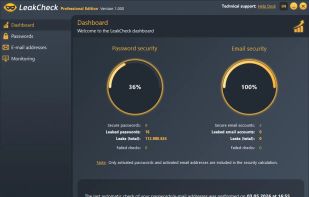
The clear dashboard of LeakCheck gives you an instant overview of the security status of your passwords and accounts. Safe and compromised entries are displayed separately – including the total number of detected data breaches. This allows you to immediately see where action is needed and set priorities accordingly.
Local data storage – securely encrypted on your PC
All data stored in LeakCheck – passwords and email addresses – is saved exclusively on your local PC. To protect against unauthorized access, LeakCheck uses the Windows Data Protection API (DPAPI), which encrypts your data with a key tied to your Windows user account. This keeps your sensitive data protected even if someone else gains access to your PC.






 EU
EU


 TheEmperorArt added LeakCheck as alternative to Have I Been Pwned, Data Breach Observatory, Mozilla Monitor, Intelligence X and 28 more
 ASCOMP


No comments or reviews, maybe you want to be first?