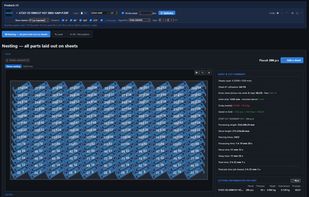
LaserCAM is a CAM tool for sheet cutting that runs entirely in the browser. You drag in DXF files, set the sheet size, material and thickness, and the parts are nested by their real outline (contour or "true shape" nesting), not by bounding rectangles: parts rotate, fit into each other and small parts are placed inside the cut-outs of larger ones. Rows of identical parts can be interlocked at a free angle, which usually fits more parts per sheet than a standard grid.
Alongside the layout you get the numbers a shop actually needs: cutting time calibrated to a machine profile (material, thickness, gas, piercings), sheet utilisation, part and scrap weight, and a price calculator with your own hourly rates. The result is exported as a nested DXF for the machine and a PDF report with the sheet view and parts list.
Other tools: kerf compensation, lead-in and lead-out placement, micro-tabs, multiple sheets filled automatically, common-line cutting for identical neighbours, manual dragging and locking with collision control, a measuring tool, undo and redo. STEP sheet-metal models are unfolded in the app, with bends, threads and countersinks listed; a PDF drawing can be checked against the model.
Straight from CAD: free add-ins for SolidWorks and Autodesk Fusion send the flat pattern of the active sheet-metal part to LaserCAM with one click. Either the nesting job opens in the browser, or the add-in silently returns weight, cutting time and price and writes them to the matching product in Odoo, with the DXF attached.
For Odoo users there is a free LaserCAM Connector module (Odoo App Store, Odoo 9 to 20, Community and Enterprise): the "Nest in LaserCAM" button in a bill of materials sends the DXF files and quantities over, and "Save to Odoo" writes time and weight per unit back into the BOM and work centre. Sign-in is single sign-on through your Odoo account, so there is no separate LaserCAM password to manage; the plan is assigned to the Odoo contact.
The free plan has no time limit and shows the full nested layout on screen without registration; paid plans unlock downloads and the shop-floor features. Available in 18 languages, light and dark theme. Made by UCASE, a small engineering company in Lithuania. The name stands for what the company does: CAD, Additive manufacturing, Scanning and Engineering, with "Your case. Solved." as the promise. UCASE does CAD design, 3D printing, 3D scanning and laser engraving for industrial customers, and LaserCAM grew out of its day-to-day work with laser-cut sheet metal parts: the tool was built for its own production first and is now open to any shop (ucase.eu).






 EU


 UCASE MB


No comments or reviews, maybe you want to be first?