


K
Konechi
Like
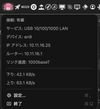
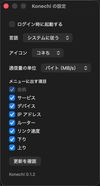
macOS shows the same Wi-Fi symbol whether or not a cable is plugged in, so it is easy to think you are on Ethernet when you are not. Konechi puts a small mark in the menu bar that tells you which one is actually carrying your traffic, and names the connection when you open it.


Cost / License
- Free
- Open Source (MIT)
Application type
Platforms
- Mac
Features


Developed by
 piro0919
 Licensing
Open Source (MIT) and Free product.Written in
Alternatives
1 alternatives listedBadge
Get an embeddable badge for KonechiSupported Languages

AlternativeTo Category
Network & AdminGitHub repository
- 0 Stars
- 0 Forks
- 2 Open Issues
- Updated

No comments or reviews, maybe you want to be first?