Klipprr turns a long video into the exact clips you need, in one pass, on your own Mac.
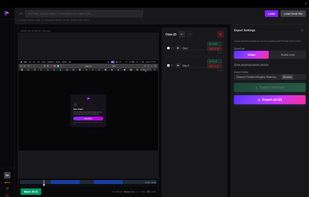
Paste a link from YouTube (videos and Shorts), Twitch (VODs and Clips), Instagram (Reels and posts), X or TikTok, or open a video file from your Mac. Klipprr loads a timeline you can scrub. Set an In point and an Out point and that segment becomes a clip in the sidebar. Repeat for every moment you want, then press Export once. Up to 4 clips export in parallel.
For YouTube, Twitch, Instagram and X you do not need to download the whole video first. Klipprr fetches the part you marked. TikTok links take longer to load than the other sources.
Everything is processed locally. Your videos never leave your Mac, and Klipprr never receives the links you clip. Export is hardware accelerated with Apple's VideoToolbox. From pasting a link to a finished file typically takes 45 to 90 seconds.
Free plan: 10 clips a month, up to 720p, with a watermark. No card needed, and it is not a trial. Downloading the app and loading a video need no account; exporting needs a free account because clip limits are tracked on our server. Pro removes the watermark and goes up to 4K with 120 clips a month. Max goes up to 8K where the source offers it, with 500 clips a month.
What it is not: a video editor, a cloud service, or a tool for archiving whole videos. If you want an entire 12-hour VOD or want to script downloads, yt-dlp is the better tool.
Requires an Apple Silicon Mac (M1 or newer). Intel Macs are not supported. You are responsible for having the rights to what you clip.
Made by Frederik Hypky, a solo founder in Slovakia.






 EU


 Frederik Hypky


No comments or reviews, maybe you want to be first?