Kformat icon
Kformat icon

Kformat

 Like

kformat is a small KDE Plasma application for formatting disks, SSDs and USB sticks. A three-step wizard walks you through it: pick the disk, pick what you want to do with it, and confirm by typing the disk's name.
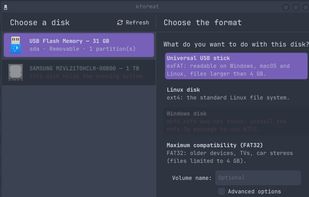
main window

Cost / License

  • Free
  • Open Source (MIT)

Application type

Since

  • New

Updated

  • Updated Oct 2026

Platforms

  • Linux
0likes
0articles
Save

Features

Features

Highlights All activities

Kformat News & Activities

Recent activities

Kformat information

AlternativeTo Categories

OS & Utilities, System & Hardware

GitHub repository

  •  0 Stars
  •  0 Forks
  •  0 Open Issues
  •   Updated  
View on GitHub
Kformat was added to AlternativeTo by thongor77 on and this page was last updated .

No comments or reviews, maybe you want to be first?

Official Links

What is Kformat?

kformat is a small KDE Plasma application for formatting disks, SSDs and USB sticks. A three-step wizard walks you through it: pick the disk, pick what you want to do with it, and confirm by typing the disk's name.

It is built for the everyday task — "format this stick, without wiping the wrong disk" — rather than full partition management. Plain-language presets (universal USB stick, Linux disk, Windows disk, maximum compatibility) pick a sensible file system for you, or you can choose the file system, partition table (GPT/MBR) and erase mode yourself. It supports ext4, Btrfs, XFS, F2FS, exFAT, FAT32 and NTFS; a format whose tool is not installed is greyed out and tells you which package to install.

Safety comes first. A disk that holds the running system is never offered (including root on LUKS/LVM/RAID and active swap), nothing runs until you type the disk's exact name, and the disk is checked again before every step. kformat also asks systemd-logind not to suspend or shut down while it writes. It has no privileged helper of its own: it talks to udisks2, so authorization goes through polkit.

It integrates with Plasma: an application launcher, and a "Format with kformat…" action in the Devices widget. The interface is in English, French and Spanish and follows your system language. Written in Rust with a Kirigami interface.