KeyShuttle icon
KeyShuttle icon

KeyShuttle

KeyShuttle lets you use one Apple Magic Keyboard with both your Mac and your Windows PC. The Magic Keyboard can only be paired with one computer at a time, so switching normally means forgetting it on one machine and pairing it again on the other.
KeyShuttle screenshot 1

Cost / License

  • Pay once
  • Proprietary

Platforms

  • Mac
  • Windows
0likes
0articles
Save

Features

  1.  Sits in the System Tray
  2.  Sits in the menu bar
  3.  Virtual KVM Switch

 Tags

KeyShuttle News & Activities

Highlights All activities

Recent activities

KeyShuttle information

Popular alternatives

View all
KeyShuttle was added to AlternativeTo by Matej-Krajnc on and this page was last updated .

No comments or reviews, maybe you want to be first?

What is KeyShuttle?

KeyShuttle lets you use one Apple Magic Keyboard with both your Mac and your Windows PC. The Magic Keyboard can only be paired with one computer at a time, so switching normally means forgetting it on one machine and pairing it again on the other. With KeyShuttle you press Control + Option + Command + K and the keyboard moves to the other computer in a few seconds – and back with the same keys (Ctrl + Alt + Win + K on Windows).

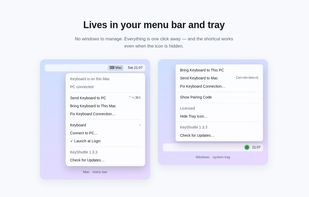
KeyShuttle runs as a small menu bar app on the Mac and a tray app on Windows. The two apps find each other on your local network and exchange signed messages; nothing goes through the cloud and no account is needed. When you shut down one computer, the keyboard moves to the other one automatically, and if a hand-over ever fails, the keyboard comes straight back.

Features:

  • One shortcut on both computers
  • Works between macOS and Windows (not just Mac to Mac)
  • Local network only, no account, no cloud
  • Automatic hand-over when a computer shuts down
  • "Fix Keyboard Connection" to reset a stuck keyboard
  • Automatic updates

Requirements: macOS 13 or later, Windows 10 or 11 with Bluetooth, both computers on the same network. Price: free 14-day trial, then a one-time purchase for one Mac and one PC.

