KDE Pomodoro icon
KDE Pomodoro icon

KDE Pomodoro

A native Plasma 6 panel widget that keeps your current focus and live Pomodoro countdown one click away.
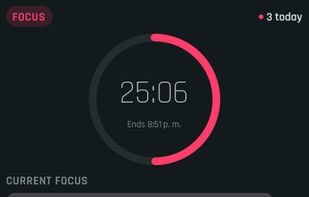
KDE Pomodoro screenshot 1

Cost / License

  • Free
  • Open Source (MIT)

Application type

Platforms

  • Linux
  • KDE Plasma
0likes
0comments
0articles

Features

Properties

  1.  Lightweight
  2.  Privacy focused

Features

  1.  No registration required
  2.  Ad-free
  3.  Works Offline
  4.  No Tracking
  5.  Pomodoro Timer
  6. KDE Plasma icon  KDE Plasma integration
  7.  Sits in the System Tray

KDE Pomodoro News & Activities

Highlights All activities

Recent activities

KDE Pomodoro information

  • Developed by

    EC flagVasiliy Kirochka
  • Licensing

    Open Source (MIT) and Free product.
  • Alternatives

    46 alternatives listed
  • Supported Languages

    • English

AlternativeTo Category

Office & Productivity

GitHub repository

  •  1 Stars
  •  0 Forks
  •  0 Open Issues
  •   Updated  
View on GitHub
KDE Pomodoro was added to AlternativeTo by Paul on and this page was last updated .
No comments or reviews, maybe you want to be first?

What is KDE Pomodoro?

A native Plasma 6 panel widget that keeps your current focus and live Pomodoro countdown one click away.

Both layouts are one checkbox apart. The widget follows your Plasma color scheme, so the phase colors above will match whatever theme you run.

Features:

The timer

  • Live countdown and circular progress indicator on horizontal or vertical panels
  • Focus, short-break, and long-break phases, with a configurable number of focuses before each long break
  • Estimated finish time for the running interval, in your local 12- or 24-hour format
  • Start, pause, restart, and skip, from the popup or the right-click menu
  • Optional auto-start of breaks and of focus intervals, toggled independently
  • Built-in presets — Classic (25/5/15), Deep work (50/10/30), Long haul (90/20/30)

Staying oriented

  • An editable current focus description, shown in the popup, the tooltip, and the panel itself
  • Session pips showing how far you are through the cycle toward the next long break
  • Daily count with automatic midnight reset, plus a manual reset in the right-click menu
  • Lifetime focus total alongside today's count in the tooltip

Fitting into Plasma

  • Phase colors derived from your color scheme rather than hardcoded, so light, dark, and high-contrast themes all work
  • Separate notifications for the end of a focus interval and the end of a break, each with its own sound and an action to start the next interval, all configurable in System Settings ? Notifications
  • The timer deadline is wall-clock based, so a running interval survives a Plasma shell restart, a suspend, or a logout without drifting
  • Pure QML and standard KDE Frameworks — no compiled plugin, no external dependencies

Official Links