JUMP icon
JUMP icon

JUMP

 Like

JUMP is a keyboard navigation utility for macOS. Press a shortcut and every clickable element in the focused window gets a short label. Type the label and JUMP clicks it. Hold Shift to right-click, Command to double-click or Option to only move the pointer.
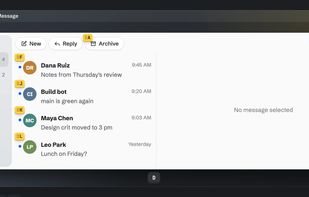
Hint labels on every clickable element in a Mail window

Cost / License

Platforms

  • Mac  Requires macOS 26 or later.
0likes
0articles
Save

Features

Properties

Features

Highlights All activities

JUMP News & Activities

Recent activities

JUMP information

AlternativeTo Categories

Office & Productivity, OS & Utilities, Development

GitHub repository

  •  0 Stars
  •  0 Forks
  •  0 Open Issues
  •   Updated  
View on GitHub

Popular alternatives

View all
JUMP was added to AlternativeTo by alvaldes on and this page was last updated .

No comments or reviews, maybe you want to be first?

Official Links

What is JUMP?

JUMP is a keyboard navigation utility for macOS. Press a shortcut and every clickable element in the focused window gets a short label. Type the label and JUMP clicks it. Hold Shift to right-click, Command to double-click or Option to only move the pointer.

It also has a Vim-style scroll mode (h j k l, d u, gg G) and a text search mode that finds visible text, ignoring case and accents. Shortcuts, modifiers and label appearance can be changed in Settings, and you can exclude apps where the shortcuts stay off.

JUMP reads the interface through the macOS Accessibility API. For windows that don't expose their text, such as terminals or PDFs, it can optionally recognize on-screen text with the Vision framework; captures never leave memory.

JUMP is free and open source under GPL-3.0, based on the code of Vimac and modernized for macOS 26.
