


iSpring Presenter
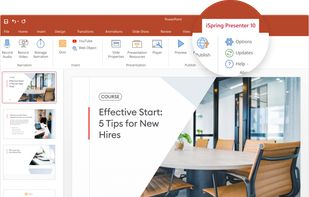
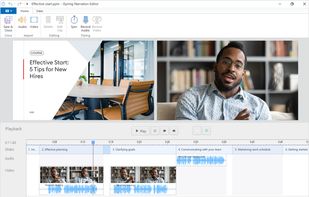
A robust authoring tool for creating vivid, engaging presentations right in PowerPoint. Enhance your projects with talking head video narrations and quizzes, then publish the course to your website, YouTube, or a learning management system.
Cost / License
- Pay once
- Proprietary
Platforms
- Windows
- Microsoft Office Powerpoint


Features
- Quiz Maker
- Interactive Presentations
Tags
- video-presentation
- online-course
- e-learning-authoring
- create-video-presentation
- html5-presentation-tool
- html5-presentation
- convert-powerpoint-to-html5
- online-course-software
- course-creator
- create-elearning-course
- Convert Powerpoint to Flash
- courses
- Online Presentation
- video-lectures
- powerpoint-to-html5-converter
- Online Courses
- create-video-stories
- authoring
- create-online-courses
- powerpoint-to-html5
iSpring Presenter News & Activities
Recent activities
iSpring Presenter information
Developed by
 iSpring
 Licensing
Proprietary and Commercial product.Pricing
One time purchase (perpetual license) that costs $0.Alternatives
8 alternatives listedSupported Languages
- English
AlternativeTo Category
Remote Work & Education


What is iSpring Presenter?
iSpring Presenter is the best-in-class tool for creating stunning content right in PowerPoint and sharing it on any device.
All the effects you build in PowerPoint are preserved perfectly when you convert to online formats. Along with your video narrations, your presentations can also be enhanced with web content like YouTube and Vimeo videos, or even live web pages.
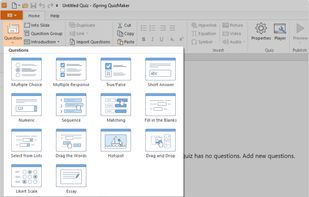
iSpring Presenter also provides you with a quiz authoring tool to enhance PowerPoint presentations with engaging, interactive quizzes and surveys with 14 different question formats. The quiz editor allows you to switch between a Form View mode for configuring question properties, scoring, etc., and a Slide View mode for designing the look and feel of multiple questions at once.
In just one click, your video presentation is ready for sharing on the Web, or even a Learning Management System. The HTML5 format provides the perfect balance of compatibility for viewing on any device, and the adaptive player fits just right on any screen.
This tool is perfect for anyone who wants to create awesome video presentations Quickly and easily in the familiar PowerPoint interface, and then share them instantly and collect feedback and statistics from surveys and quizzes.
Comments and Reviews
I think if you need all features from iSpring, it's time to try iSpring Presenter - Pro & QuizMaker - 2 in 1! And not so expensive.