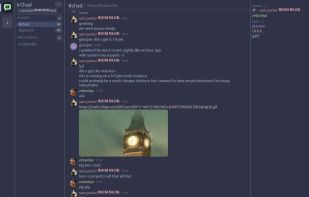
IrChad is a free, open-source chat app that works like Discord but runs on servers you control. You get servers with channels, voice channels, screen share, replies, reactions, GIFs, file uploads and end-to-end encrypted DMs. There are no paid tiers, no ads and no tracking.
Under the hood it's IRC. Text goes over IRCv3 to the IRC server, and voice and video go through a self-hosted LiveKit server. Your friends don't need to know any of that, though. They open an invite link, pick a name and start chatting, with no server lists, no NickServ and no bouncer to set up. People who prefer a plain IRC client can still join the same channels and see normal messages.
Features:
- Invite links that set up the whole network in one click, with guest join, login and sign-up inside the app
- Always online: your account stays in its channels after you close the app, the network keeps what's said while you're away, and your PC and phone count as the same user
- Message history from the server, cached locally, with read markers that sync across your devices
- Replies, emoji reactions, typing indicators, message deletion, an emoji picker with :shortcodes:, and GIF search
- File and image uploads with inline media and link previews. The server fetches previews, so your IP isn't leaked.
- Voice channels with echo cancellation, noise suppression (optionally RNNoise), and voice activity or push-to-talk (push-to-talk works on Wayland too)
- A soundboard for the network's own clips
- Screen or window sharing at up to source resolution, with hardware encoding and per-app audio, so your notifications and music stay out of the stream
- Stage view, fullscreen, pop-out and floating windows for watching streams
- End-to-end encrypted DMs (Olm double ratchet), emoji device verification, and warnings when a contact's keys change
- Notifications, tray icon, a Ctrl+K quick switcher, CJK input methods and screen-reader support
- Several networks open at once
Linux is the main platform, with Wayland and X11 both fully supported, native PipeWire audio, and screen capture through the desktop portal. There are also builds for Windows and an Android app, where voice and watching screen shares work and the rest is still in progress.
Self-hosting takes one compose file, which runs ergo, LiveKit, chadd (IrChad's small login and upload server) and Caddy behind a single HTTPS address. Your messages and files stay on your own machine. Admins manage the network with any regular IRC client.







 Sam Hoffman


No comments or reviews, maybe you want to be first?