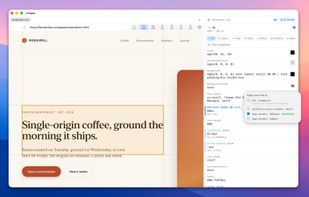
InSpec CSS is a standalone CSS editor for any live web page.
Click any element on any page, dial in the styles with real visual editors — color pickers, gradient builders, shadow controls, sliders for opacity, visual builders for box-shadow, border-radius, flex, and cubic-bezier — and your edits stay put through reload, navigation, even quit and relaunch. Each edit is keyed to the page's URL.
When you're done, copy your edits out as actual CSS rules — grouped by the stylesheet they belong in, with @media wrappers in the right place, the original values left as /* was X */ comments next to your changes. The "now translate this cascade fight back into my source CSS by hand" tax is just gone.
WHY THIS EXISTS
• Edits that survive a reload. DevTools forgets every change the moment you reload. InSpec keys overrides to the page's URL and reapplies them on every load.
• Built for the handoff. Every edit captures which stylesheet, selector, and original value it overrode. The Source view rewrites your changes as ready-to-paste CSS rules, grouped by the file you'd commit them in.
• An interface for editing, not debugging. Real macOS color picker. Visual builders for box-shadow, gradients, border-radius, flex, cubic-bezier. One-click eye toggles to A/B compare. The panel is shaped around changing styles, not just reading them.
• Spacious, not stuffed in a sidebar. InSpec is its own window. Responsive viewport presets, inspect mode, alignment guides, and the page-overrides badge all live in the top bar, always one click away.
• Breakpoint-aware overrides. Edit a property whose source rule sat inside an @media block and the override scopes to the same query — no leak to other breakpoints, no leak to the base style. Per-property picker for any edit's applies-to set.
• One-click "mute the page" to A/B compare overrides against the original without losing them. Per-property eye toggles for finer pauses.
• DOM nav built for editing. Right-click any element to walk ancestors and children inline.
• Local files too. Open any local .html with relative resources resolving correctly — review designer mockups before they're deployed.
InSpec is featherweight and native. SwiftUI + WebKit + a small injected JS inspector. No telemetry, no servers, no remote dependencies.







 Paul added InSpec as alternative to CSS Peeper, VisBug, SuperDev Pro, SnipCSS and 10 more


No comments or reviews, maybe you want to be first?