



Inky - Clipboard App
1 like
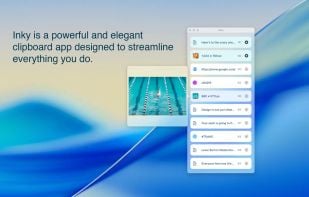
Inky is a clipboard app for designers, developers and creatives. Save text, links, images, and colors effortlessly to streamline your creative workflow.

Features
Properties
- Lightweight
- Privacy focused
Features
- Dark Mode
- No registration required
- Ad-free
- No Tracking
- Works Offline
- Support for Keyboard Shortcuts
- Drag and Drop
- Image Preview
Inky - Clipboard App News & Activities
Highlights All activities
Recent activities
 gustavosett added Inky - Clipboard App as alternative to Windows Clipboard For Linux
- namdx1987 liked Inky - Clipboard App
 POX added Inky - Clipboard App as alternative to CopyQ, Ditto, PasteBar and Planck
- POX added Inky - Clipboard App

Inky - Clipboard App information
Developed by
David MaciejewskiLicensing
Proprietary and Free product.Alternatives
52 alternatives listedSupported Languages
- English


No comments or reviews, maybe you want to be first?
What is Inky - Clipboard App?
Inky is a clipboard app for designers, developers and creatives. Save text, links, images, and colors effortlessly to streamline your creative workflow.
Key features:
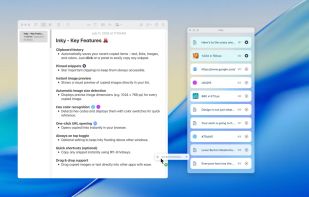
- Clipboard history: Automatically saves your recent copied items – text, links, images, and colors. Just click on a panel to easily copy any snippet.
- Pinned snippets: Star important clippings to keep them always accessible.
- Instant image preview: Shows a visual preview of copied images directly in your list.
- Automatic image size detection: Displays precise image dimensions (e.g. 1024 × 768 px) for every copied image.
- Hex color recognition: Detects hex codes and displays them with color swatches for quick reference.
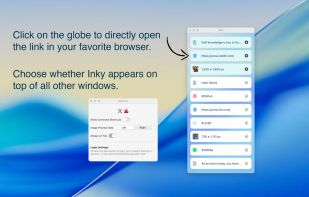
- One-click URL opening: Opens copied links instantly in your browser.
- Always on top toggle: Optional setting to keep Inky floating above other windows.
- Quick shortcuts (optional): Copy any snippet instantly using ?1-9 hotkeys.
- Drag & drop support: Drag copied images or text directly into other apps with ease.
- Clean, minimal design: Elegant interface built for focus and speed, using the latest liquid glass design elements.
- Privacy first: No data collection, tracking, or cloud syncing. Your clipboard stays yours.
- Dark Mode: Light or dark, Inky’s color scheme adapts to your Mac’s settings.
