HyprMod icon
HyprMod icon

HyprMod

 Like

A native GTK4/libadwaita settings app for Hyprland — tweak any option, see it change live, save when you're happy.
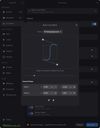
HyprMod screenshot 1
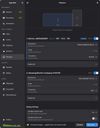
HyprMod screenshot 2

Cost / License

Since

  • Since 2026 (updated Oct 2026)

GitHub

  • GitHub stars: 1.1k

Platforms

  • Linux
  • Python
0likes
0articles
Save

Features

Properties

Features

Highlights All activities

HyprMod News & Activities

Recent activities

HyprMod information

AlternativeTo Categories

OS & Utilities, System & Hardware

GitHub repository

  •  1,087 Stars
  •  25 Forks
  •  7 Open Issues
  •   Updated  
View on GitHub

Popular alternatives

View all
HyprMod was added to AlternativeTo by Paul on and this page was last updated .

No comments or reviews, maybe you want to be first?

Official Links

What is HyprMod?

A native GTK4/libadwaita settings app for Hyprland — tweak any option, see it change live, save when you're happy.
Highlights:

  • Live preview — every change applies instantly to your running compositor. No need to restart or reload.
  • Your config stays untouched — HyprMod writes only to its own hyprland-gui.conf. Your hand-crafted config is never modified.
  • Undo with Ctrl+Z — changes apply live, so mistakes need a quick escape hatch. Step back one change at a time.
  • Profiles — save, name, and switch between complete configurations. Each profile is a shareable .conf file.

Features:

  • Bezier Curve Editor — draggable control points, live animation preview, preset library, bidirectional sync between canvas and number inputs.
  • Monitor Configuration — per-monitor resolution, refresh rate, position, scale, transform, and mirroring controls with a layout preview canvas. VRR, HDR, and 10-bit detection.
  • Keybind Editor — modifier toggles, interactive key capture, dispatcher selection. Your original binds shown read-only for reference.
  • Config DNA — every profile gets a unique visual fingerprint derived from a hash of your settings. A visual signature for your rice.
  • Global Search — Ctrl+F across all options, navigates to the match with a highlight pulse.
  • Micro-interactions — accent borders on modified options, inline reset buttons, animated save states, shake on error.