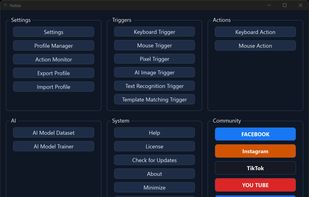
Hutsix is a Windows desktop automation tool for repetitive keyboard and mouse work. It is built around profiles: a profile contains bindings, and each binding pairs a trigger with an action. When a profile is active, Hutsix continuously evaluates the bindings and runs an action only when its trigger condition is satisfied.
Six trigger types:
- Global hotkeys and mouse buttons
- Pixel colour, single point or multi-point, with tolerance
- Template matching (OpenCV) for an image that appears on screen
- OCR text detection — fire when specific words appear at a screen position
- AI image detection, using a model trained on your own screenshots
- Timed repeat while a trigger remains active
Actions cover keyboard input (single keys, combinations, sequences, typed text) and mouse input (clicks, moves including smooth movement, drags and scroll wheel).
Controls that matter in practice:
- Focus guard, so actions only fire while the intended window is focused
- Per-binding cooldown to stop an action repeating too quickly
- Action Monitor showing what fired, what was skipped and why
- Per-binding diagnostics
- Multi-monitor and HDR display support, reading only the screen region being watched
Everything runs locally. Profiles can be exported and shared, with bundled assets included.
Requirements: Windows 10 or 11, 64-bit; administrator rights to install; internet for the first license activation. Core automation (hotkeys, macros, pixel and template triggers) needs no GPU — 2 CPU cores and 8 GB of RAM. OCR and AI image triggers also run on the CPU, with a CUDA-capable GPU optional for speed.
Hutsix is proprietary software with a free 7-day trial and a one-time $49 license. There is no subscription. Some applications and services prohibit automation, so you are responsible for how you use it.






 EU


 Hutsix added Hutsix as alternative to AutoHotkey, AutoIt and Pulover’s Macro Creator


 Hutsix


No comments or reviews, maybe you want to be first?