hue.tf is a browser-based colour palette tool with a simple goal: turn an image into a usable palette without sending the image anywhere. Drop in a photo, screenshot, illustration, or reference image, and the app extracts a set of representative colours. The palette can then be refined, edited, shared, and exported in several formats. Everything runs in the browser tab. There is no account, no upload, no cloud library, and no build step.
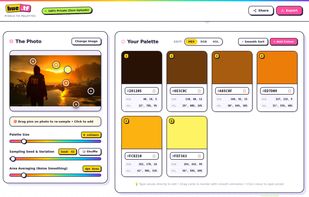
The workspace keeps the source image and palette side by side. Supported inputs include WebP, AVIF, PNG, JPEG, and SVG, depending on the browser's own decoding support. Automatic extraction runs on a small copy of the image, using seeded sampling, median cut, and k-means refinement. The palette size can be set from 2 to 32 colours. The seed makes results reproducible, while a reroll button can produce a different starting point. Area averaging smooths noisy images. Each colour is linked to a position in the photo.
Colour pins on the image show where each colour came from, and they can be dragged to re-sample a region. Clicking the image adds a colour. A magnifier shows the pixels under the pointer, and the screen eyedropper is available where the browser supports it. The palette can be edited in HEX, RGB, or HSL, reordered by dragging, sorted by hue and lightness, and changed with add or delete.
Export is designed for real use. Showcase cards can be saved as high-resolution PNG or vector SVG, with selectable aspect ratios and swatch layouts. Strip layouts are disabled above ten colours so labels stay readable. Palettes can also be exported as CSS variables, SCSS variables, Tailwind colours, JSON tokens, plain HEX or HSL lists, or an Adobe Swatch Exchange file for Photoshop, Illustrator, InDesign, and Procreate.
Share links put the palette in the URL hash, so it is not sent to a server. The link contains only the colours, not the original image. Images are decoded and sampled locally, and the app uses no analytics or tracking scripts. Privacy browsers and canvas blocking extensions can prevent pixel access, which may cause random colours, striped previews, failed sampling, or broken PNG exports. Manual editing, shared palettes, code exports, SVG cards, and ASE files remain available in that situation.
Some privacy browsers disable JavaScript JIT compilation, making extraction and canvas rendering slower and causing fan activity during export. Smaller palettes, simpler card backgrounds, and a smaller export ratio reduce the load. A browser or profile with JIT enabled will be faster if that trade-off is acceptable.







 Anuj K added hue.tf as alternative to Paletton, Color UI, Super Color Palette, Color Palette Generator and 10 more


No comments or reviews, maybe you want to be first?