You can't Google your way online when you're not online.
You're at the gate. Meeting in four minutes. The hotel Wi-Fi connected, but the login page won't open. Safari spins. Your VPN icon is still on. Somewhere, iCloud Private Relay is silently breaking everything; and you can't look up how to fix it, because you're not online.
Hotspot Guide is built for that moment. Install it once. The next time a captive portal won't load, open the app and it tells you exactly what's wrong and exactly how to fix it.
WHAT IT CHECKS, IN UNDER 5 SECONDS
• Captive portal detection, is the login page even reachable?
• iCloud Private Relay, the #1 silent culprit on hotel Wi-Fi
• Custom DNS (1.1.1.1, 8.8.8.8) bypasses the portal redirect
• Active VPN and proxy blocks portal traffic before it reaches you
• MDM and managed profiles locks you out of fixes
• Real internet vs. portal HTML verifies you're truly online
WHAT YOU GET FOR THE MOMENT IT MATTERS
• One-tap deep links into System Settings - fix in two clicks, not ten
• Built-in portal browser - auto-detect when login completes
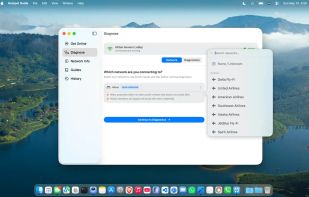
• Saved-portal autofill - re-join the same Hilton or American Airlines network without retyping your name and email every time (stored in your Mac's Keychain only)
• Six offline troubleshooting guides - readable with zero connectivity
• Curated database of major hotels, airports, airlines, and cafés with venue-specific tips
• Speed, latency, packet loss, and jitter - know whether the Wi-Fi is slow or just flaky
• Nearby networks scanner - see channel congestion, signal strength, and security at a glance
• Connection history with average speeds per network - know which lounge has the fastest Wi-Fi
• Public IP, ISP, signal, channel, and protocol - power-user info, one tab away
ENGINEERED FOR MAC
Native SwiftUI. App Sandbox. No background processes. No tracking. Diagnostic data never leaves your Mac. Credential vault uses the same Keychain that stores your Safari passwords. Works the moment you launch it, including when you're completely offline.
WHO THIS IS FOR
• Frequent business travelers who burn an hour a month on bad hotel Wi-Fi
• Remote workers who hop between cafés, coworking spaces, and airports
• IT admins who want a portable, sandbox-safe tool for diagnosing field issues
• Anyone who's ever tethered to a phone just to fix a captive portal
DISCLAIMER
Hotspot Guide diagnoses device-level network blocks and provides step-by-step solutions. It cannot, however, resolve physical hardware failures or venue-wide service outages. For those issues, please contact the venue's management.
Built by a frequent traveler who got tired of tethering every time a Marriott portal misbehaved.







 Paul added Hotspot Guide as alternative to WinMTR

No comments or reviews, maybe you want to be first?