HelioPeak icon
HelioPeak icon

HelioPeak

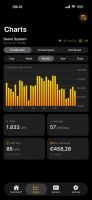
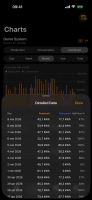
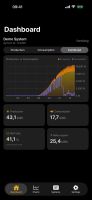
HelioPeak gives you a clean, modern way to monitor your solar panel production and consumption using your PVOutput.org data.
HelioPeak screenshot 1

Cost / License

  • Freemium (Pay once)
  • Proprietary

Platforms

  • iPhone
  • iPad
HelioPeak screenshot 1
HelioPeak screenshot 2
+6
HelioPeak screenshot 3
0likes
0comments
0alternatives
0articles

Features

No features, maybe you want to suggest one?

HelioPeak News & Activities

Highlights All activities

Recent activities

HelioPeak information

  • Developed by

    BE flagSven De Troch
  • Licensing

    Proprietary and Freemium product.
  • Pricing

    One time purchase (perpetual license) that costs $6 + free version with limited functionality.
  • Alternatives

    0 alternatives listed
  • Supported Languages

    • English
    • Dutch
    • French
    • German
    • Italian
    • Spanish
HelioPeak was added to AlternativeTo by svendt on and this page was last updated .
No comments or reviews, maybe you want to be first?

What is HelioPeak?

HelioPeak gives you a clean, modern way to monitor your solar panel production and consumption using your PVOutput.org data — now with a dedicated iPad layout, year-over-year comparisons, annotations, and exportable annual reports.

iPAD & MAC Native iPad layout with sidebar navigation, Inspector panel, year heatmap, and full keyboard shortcut support Also runs on Apple Silicon Macs (Designed for iPad) iPhone landscape chart-priority mode — rotate to give the chart full breathing room

DASHBOARD & CHARTS Dashboard with live power readings and daily production overview Production, Consumption, and Combined views — see what you generate, what you use, and how they balance out Self-use percentage and net export/import stats Interactive charts for Day, Week, Month, Year, and All Time periods Drill down from Total to Year to Month to Day with a single tap Calendar and Rolling chart modes — see fixed periods or sliding windows Tap and drag on any chart to explore individual data points Pull-to-refresh to reload the latest data Detailed data table below each chart with sortable columns Sparklines on stat cards for quick trend visualization

Official Links