'Has Happened' is an ultra-fast blend of event-tracker, diary and calendar.
It's task is to keep track of what Has Happened in your daily life -
focusing on
- 'events that have happened'
like 'get praised by the boss', 'receive flowers from a loved one', 'experience some head-ache' etc
- 'events that you do once in a while'
like 'wash your car', 'send your pet for grooming', ' visit your old aunty', or 'wash living-room curtains' etc
- 'important data you want to track'
like recording you weight, your blood-pressure etc
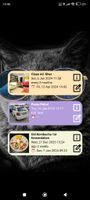
These are all events you want to keep track, in an easy and fast way - just by clicking on the event.
Here are some features of the app:
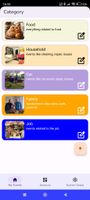
🌟 Organize Events into Categories
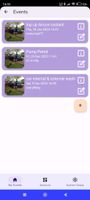
🌟 Personalize your Categories and Events with an icon, an image from your gallery, a unique color
🌟 Ultra-fast logging of events - just a Click
🌟 Secure selected Categories via Biometric Authentication
🌟 Set absolute (at a specific time) and relative (in a specific time) reminders
🌟 Review upcoming Reminders, Snooze if needed
🌟 Reminders will survive re-boot, and re-installation
🌟 Synchronize events to an on-device Calendar
🌟 Analyze events over Time, and get valuable insights
🌟 Add widgets to your Home-Screen, for ultra-fast One-Click access
🌟 Create 'Timed-Events', to track Start- and Stop Time
🌟 Track Stop-Time by just a Click
🌟 Add 1 or 2 data-fields to events, and graphically evaluate important trends like fuel-consumption per km, weight
🌟 Select Day, Night or System Mode colors
🌟 Backup and Restore the Database (Full Version)
The app does not require internet-access (besides the communication with Google for licensing), and data is only shared with on-device calendars (like Google-calendar) after switching on this feature.







No comments or reviews, maybe you want to be first?