


Handbrake Batch Encoder
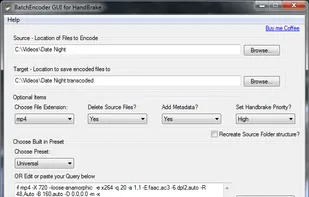
HB Encoder is a full user interface for all forms of HandBrake batch encoding, giving you an easy way to encode multiple files with Handbrake at once. Simply install HandBrake and run the program.
Cost / License
- Free
- Proprietary
Alerts
- Discontinued
Platforms
- Windows
The program is no longer updated since 2011 and downloads are no longer available.

Features
- Portable
- Batch conversion
Handbrake Batch Encoder News & Activities
Recent activities
- Ludy_dev liked Handbrake Batch Encoder
Handbrake Batch Encoder information
Developed by
videoscriptsLicensing
Proprietary and Free product.Alternatives
67 alternatives listedSupported Languages
- English


What is Handbrake Batch Encoder?
HB Encoder is a full user interface for all forms of  HandBrake batch encoding, giving you an easy way to encode multiple files with Handbrake at once. Simply install HandBrake and run the program.
This supports source files : avi, mkv, m2ts,mpg. flv, mov, ts and also supports rips in VIDEO_TS folders.
You can use handbrake presets, edit a query or use your own query and even save a custom query.
You can choose to delete or leave source files
Adds metadata and cover art automatically ready for iTunes
Displays a small progress bar while running, remembers all last used settings
Supports recursive file recreation in the destination folder.
Comments and Reviews
To transcode multiple files on Handbrake, you have to select each file one-by-one. That's a major pain in the butt. This app makes it easy, without having to figure out what a batch script is.