Hammerdeck is a menu bar app that puts window management for large and multiple displays on the keyboard. It is free and open source under the GPL-3.0 license and runs on macOS 13 or later, on Apple Silicon and Intel.
Window features:
- Window Grid: place the focused window on a 3x3, 2x2 or 6-cell grid, in one cell or across the rectangle between two cells.
- Window Snap: send the focused window to the next display, snap it to a half, toggle maximize or 75%, move it to a rectangle you saved, or swap the windows of two displays in one step.
- Window Mode: a keyboard layer for moving, resizing, corners and centering, active until you press Escape.
- Window Deck: tile a screen's windows into a grid; the window you focus becomes a large centered window and the others stay visible behind it.
- Window Fan: spread a screen's windows against its edges so each keeps a visible edge you can click to switch to it.
- Window Rewind: one hotkey undoes the last snap, display swap, grid or deck move.
Every action can be bound to a hotkey or a chord (a shortcut followed by a second key). Actions that do not depend on the current window can also run on a schedule or on a system event such as wake or screen unlock.
A rules engine reacts to what the Mac is doing. For example, when a display connects it can move your windows back into a saved layout. Rules can also run any feature's action, set the wallpaper, lock the screen, launch or quit an app, or run a macOS Shortcut.
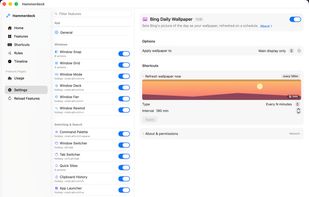
Each feature is a switch in Settings with its own options and trigger picker, so there are no scripts or config files to write. Besides the window features, Hammerdeck includes a window switcher, a command palette, an app launcher, clipboard history and a few text and break-reminder utilities, which stay off until you switch them on.
Hammerdeck needs no account. Each shortcut press briefly shows which action ran, and the app's decisions are written to a plain-text log on your Mac.
Install from the website, from GitHub releases, or with Homebrew: brew install --cask kouxing2000/tap/hammerdeck








 peach-studio added Hammerdeck as alternative to Rectangle, Moom, Divvy, Loop - Window Management and 2 more


No comments or reviews, maybe you want to be first?