

HaloVoice
AI voice translator and real-time voice translation for gaming, streaming, and meetings. Use it as a Discord voice translator, OBS voice translator, or live voice translator.
Cost / License
- Freemium (Subscription)
- Proprietary
Application type
Platforms
- Mac
- Windows
- Online
- Chrome OS
- Software as a Service (SaaS)
Features
Properties
- Privacy focused
- Lightweight
- AI-Powered
Features
- Website Translation
- Ad-free
- Dark Mode
- Real Time Chat
- Translator
- Streaming
HaloVoice News & Activities
Recent activities
- AlisonT added HaloVoice
- Maoholguin updated HaloVoice
- AlisonT updated HaloVoice
AlisonT added HaloVoice as alternative to Wordly, LiveInterpret.AI, Palabra.ai and Maestra
HaloVoice information
What is HaloVoice?
HaloVoice is an AI-powered real-time voice translator built for gaming, streaming, meetings, and multilingual voice chat. It translates your voice in real time while preserving a natural speaking experience, helping you communicate across languages without interrupting the conversation.
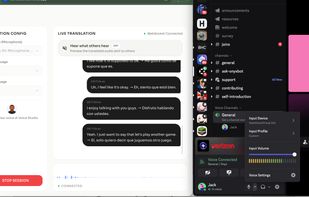
HaloVoice works as a gaming voice translator, game voice translator, voice chat translator, Discord voice translator, OBS voice translator, and live voice translator. Through the HaloVoice Virtual Microphone, you can send translated speech directly into Discord, OBS, Zoom, Slack, Microsoft Teams, and other apps.
For gamers, HaloVoice enables real-time voice translation for gaming and multilingual voice chat with international teammates. It can be used as a Valorant voice translator or Minecraft voice translator, as well as with other games and gaming communities that rely on real-time voice communication.
For streamers and creators, HaloVoice provides real-time voice translation for streaming and can work as an OBS voice translator or Twitch voice translator, helping creators communicate with audiences who speak different languages.
HaloVoice also supports multilingual communication scenarios such as Spanish-to-English voice translation and English-to-Korean voice translation, making it useful for international gaming, streaming, online meetings, and everyday cross-language conversations.
Simply select HaloVoice Virtual Microphone as the microphone input in your third-party app and start speaking. Your translated voice is delivered directly into the conversation in real time.


